Granular Synthesis
Production Techniques
Granular synthesis breaks a sound into tiny pieces called grains and then rearranges, stretches, overlaps, or scatters them. When done gently, it can create smooth time-stretching and soft clouds. When pushed harder, it can become broken, shimmering, noisy, or surreal.
It is one of the most useful methods for turning ordinary recordings into textures.
What makes it special
Unlike normal sample playback, granular tools do not have to move through the file in one simple line. They can jump around, overlap many grains, and expose details that feel hidden in the original source.
That is why granular synthesis is so useful for:
- ambient textures
- pads and drones
- unusual vocal transformations
- stretched transitions
- sound beds that feel alive
A simple listening tip
Granular sound design often works best when you stop expecting realism. Instead of asking whether it still sounds like the original recording, ask whether the new texture fits the mood and role of the track.
Also matches: granular synthesis, grain cloud, granulation, granular
Posts in this topic

Granular synthesis is a method of sound synthesis that uses small segments of audio called grains to create complex sounds. In this lesson, we will explore how to create granular synthesis in the Bitwig Grid using the Sampler module.

This video explores how to recreate and expand on Bitwig Studio's granular sampler textures mode using note repeat and modulation devices, allowing for more creative control over grain shape, pitch, and playback position. By combining multi-samples, note effects, randomization, and step modulators, you can achieve evolving and complex granular textures well beyond the limitations of the default sampler. These techniques enable richer sound design possibilities, easily adjustable and even better visualized within the Bitwig Grid for advanced users.

In this video, I discuss different methods of synthesizing sounds inside the grid, including subtractive synthesis, additive synthesis, frequency modulation, physical modeling, and granular synthesis. I provide detailed tutorials on how to create your own oscillator and change the waveform over time using modules like steps, phaser, and value. I also demonstrate how to create an additive synthesizer by adding multiple sine waves with different frequencies and how to use a filter to modify the sound. Additionally, I show how to use granular synthesis and a resonator to create interesting sounds. Overall, the goal is to encourage viewers to create sounds for their projects rather than focusing on designing instruments. If you have any questions or comments, please leave them below, and don't forget to subscribe, like, and support the channel if you enjoy the content.

In today's video, I explored the Concatenator by DataMind Audio, a unique granular audio effect that uses samples from your hard drive to replace the input signal, matching pitch and dynamics with a clever algorithm. It offers various customizable grain settings and can create interesting textures and ambient sounds, making it a versatile tool for music production. There's a seven-day trial available, and I find it an innovative concept worth checking out.

I recently bought the Scatter VST plug-in, which is a granular cloud generator. It's simple to use with only one page and lots of features. You can adjust the mix, reverb, feedback, number of grains, size, pitch, and other parameters. I love that you can add it to a chain with other effects to get bigger results. It's also on sale at the moment, so I recommend giving it a try!

In this video, I explain why there is no sine wave in a classical subtractive synthesizer. This is because sine wave has no overtones and therefore makes no sense in terms of subtractive synthesis. I explain how the filter section can be used to target and amplify the fundamental frequency as well as other partials in the harmonic series. I also provide an overview of other synthesis methods such as additive synthesis, Wavetable synthesis, FM synthesis, phase distortion, vector synthesis, granular synthesis, and physical modeling. In each of these methods, sine waves make more sense. Finally, I explain why a saw and pulse waveforms are used in polysynth - because they give different harmonic overtones.

In this video, I discuss my thoughts on the granular engine in the synth and how I miss having a record button. I demonstrate how I use my vocals recorded in a DAW to create a pad sound, adjusting the pitch and experimenting with various settings. I also showcase the use of wave tables, a morphing filter, LFOs, and effects like reverb and delay to create a textured and evolving sound.
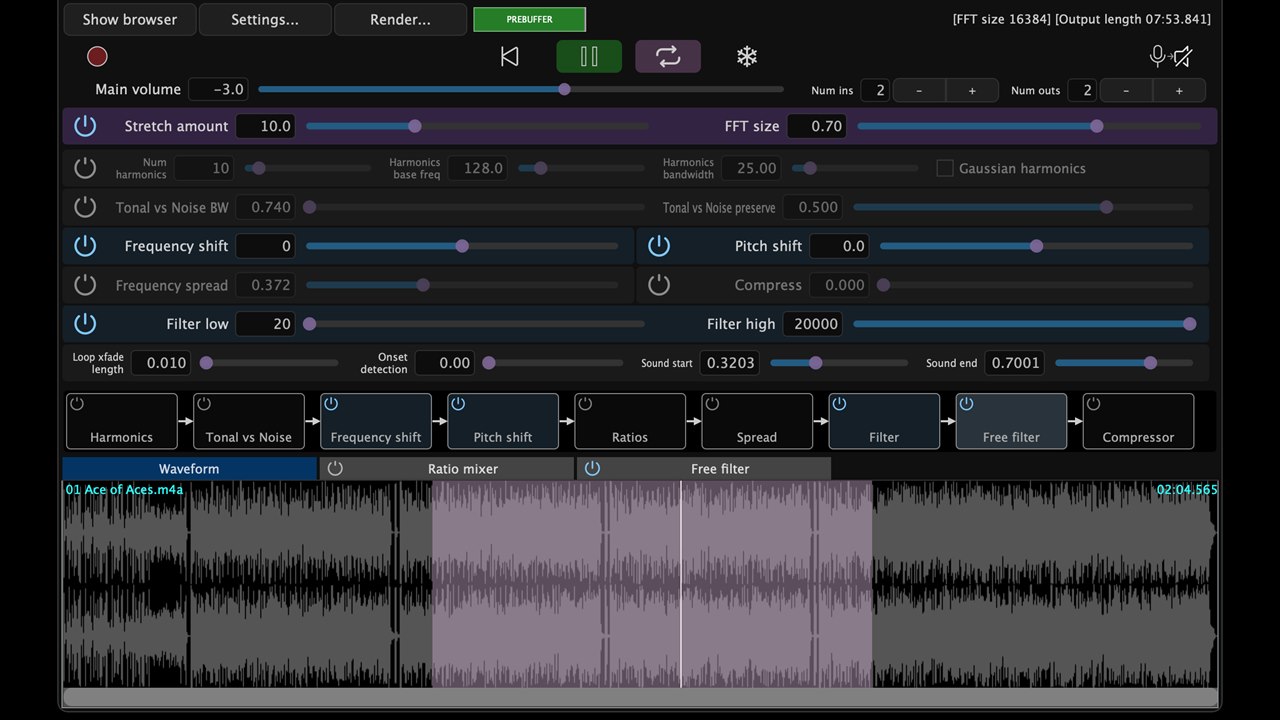
PaulXStretch is not just another granular time-stretching plugin. It is built around the Paulstretch algorithm, which stretches sound in the frequency domain, discards phase information, rebuilds the signal with randomized phase, and turns short recordings into wide, slow, spectral textures.

To perfectly sync a drum loop in a sampler to your project tempo, disable key tracking and velocity sensitivity to maintain consistent pitch and loudness, then trigger the loop on every bar instead of relying on loop mode to avoid timing drift. Use warp or stretch modes like textures with a synchronized ramp signal to modulate the playhead and ensure the drum loop follows the project tempo precisely. This method allows creative control over granular sound settings and makes it easy to slow down or speed up the loop while keeping everything in sync.

My hands-on Serum 2 review: the new third oscillator with wavetable, sample, granular and spectral modes, the refreshed GUI, expanded modulation, built-in clips and arpeggiator, plus whether the free update is worth it for existing Serum 1 owners.

In this video, I showcase my simple and highly efficient grain preset in Bitwig. By utilizing multiple recorders and adjusting recording length and spread, the preset allows for unique and diverse sounds. With the ability to manipulate play position, volume shape, playback spread, and more, this preset offers a versatile and creative tool for experimentation and sound design.

In this video, I introduce a new plugin called Current by Minimal Audio which combines various features that musicians love. The plugin includes wavetable oscillators, a granular engine, sub oscillator with harmonics, a sampler, and a range of filters. Additionally, the plugin offers modulation sources, keyboard controls, macro controls, and an impressive effect section.

This video highlights why Bitwig Studio stands out for its hands-on modularity, allowing users to easily create unique instruments and effects without coding or complex visual languages. Bitwig’s flexible modular system empowers both beginners and advanced producers to experiment, learn synthesis fundamentals, and develop custom sounds beyond what preset-heavy plugins offer. The creator emphasizes the value of creativity and learning through Bitwig’s tools, making it an ideal choice for anyone seeking a customizable and educational music production environment.

In this video, I discuss the controversial subscription system of the Current synthesizer and my personal thoughts on it. I then proceed to demonstrate how to create a pad sound using the synthesizer's newest update, utilizing various wave shapes and filters, as well as effects like chorus, delay, and reverb. I also mention the possibility of future tutorials focusing on bass sounds using Current.

The Bitwig Studio pitch shifter can shift live audio up or down by up to 12 semitones and features controls for pitch amount, grain size, and blend between dry and wet signals. Its unique grain control lets you create effects from metallic comb filtering to granular delays, making it a powerful tool for creative sound design rather than traditional pitch correction. The device excels when used in combination with other effects like reverb and delay, or in parallel processing chains, to add texture and innovative modulation to your audio.

In this video, I share my process for creating ambient music using samples from YouTube. I demonstrate how to record audio from the Windows output and use it in a granular sampler to create unique pad sounds. I also incorporate a minimal beat, piano melodies, and effects like reverb and delay to build a chill-out tune.