Bitwig Guides
I made a YouTube channel specific to Bitwig Studio and its devices, modulators, and workflows.
This archive is for quick, focused guides on Bitwig devices, concepts, and practical techniques.

The AD envelope module in Bitwig Studio's Grid is a versatile tool for shaping sounds, offering attack and decay controls with multiple modes, analog, relative, and digital, that affect timing and curve behavior. It can be triggered in various ways, looped for LFO-like effects, and used together with other envelopes for complex sound design, such as crafting kick drums. The AD module stands out for its simplicity and flexibility compared to more complex envelope modules, making it a go-to choice for quick and effective sound shaping.

The organ device in Bitwig Studio is a simple additive synthesizer that allows you to stack up to nine sine wave partials using sliders, offering pitch, glide, attack, release, gain, and panning controls. While it is not designed to emulate traditional organs, its easy layout and oscillator model options make it versatile for creating pad sounds, bass lines, and experimental textures, especially when combined with modulators and voice stacking. Despite its age and simplicity, it remains a useful tool for creative sound design within Bitwig Studio.

The Filter+ device in Bitwig Studio is a highly versatile and modular audio effect combining distortion and filtering, allowing users to shape and enhance sound in creative ways. It offers extensive customization, from swapping distortion and filter modules to flexible modulation options using built-in or external modulators, and even supports polyphonic processing for advanced sound design. With features like pre- and post-FX slots and the ability to convert to an FX grid for deep editing, Filter+ stands out as a powerful tool for everything from subtle coloring to building complex resonators and synthesizers.

Bitwig Studio's lookup tables in the Grid are versatile modules that map input values (like a phase ramp from a phasor) to corresponding output values based on predefined waveforms, such as sine, triangle, saw, or pulse, enabling highly flexible sound shaping and audio-rate manipulation. These modules work similarly to oscillators but are more modular and allow for precise control, including user-defined arrays and window functions for volume or waveform shaping. By routing different signals or modulating parameters, you can use lookup tables and related modules creatively for tasks ranging from wave shaping to arrangement automation, making them powerful tools for custom sound design within Bitwig.
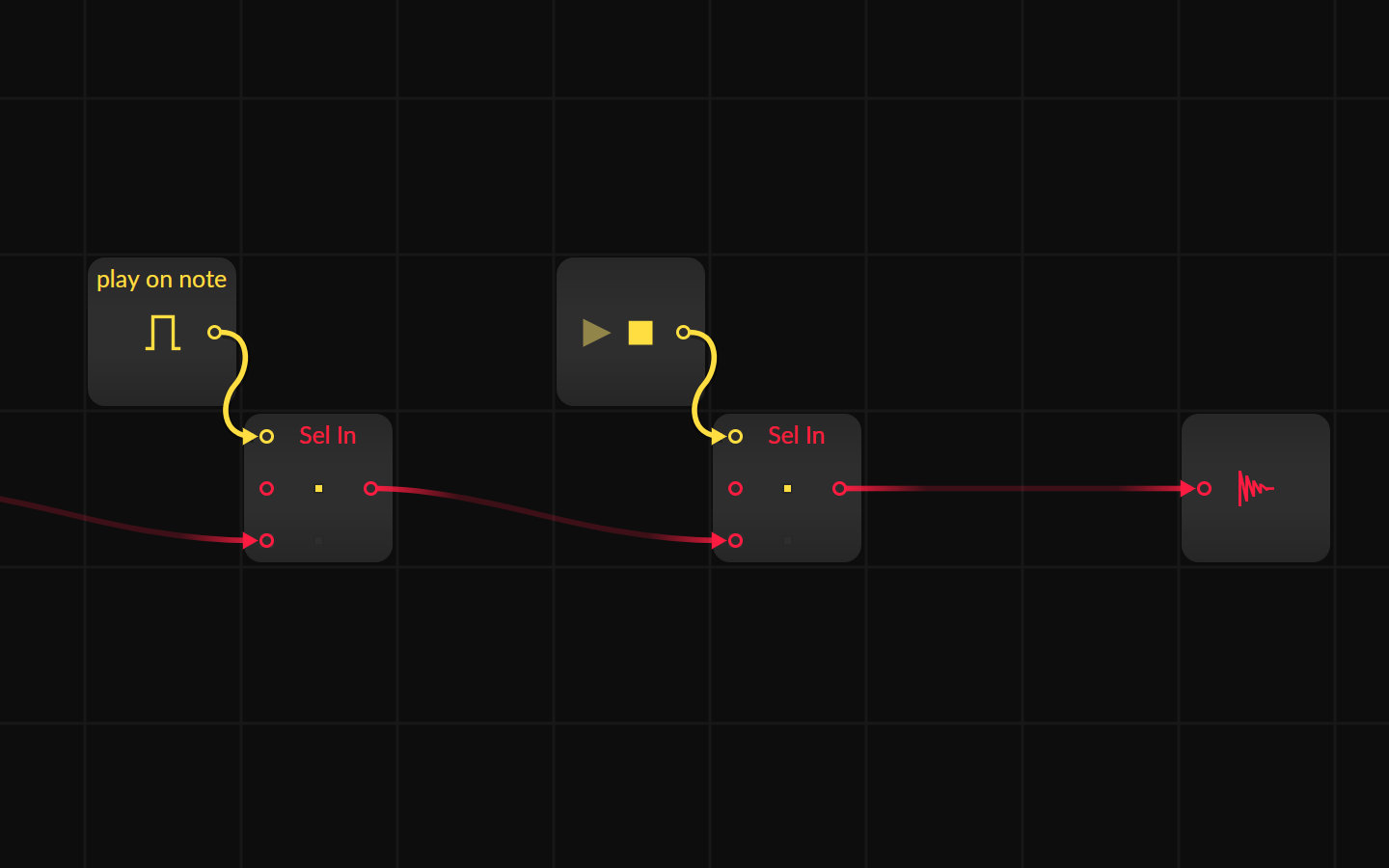
Sometimes you create a generative, self-running Grid patch and want it to stop or play at specific times. Here are some solutions to stop the grid from playing or stop the audio output with gate informations from the piano roll or the transport module.
Here all a collection of super short ideas what you can do with Bitwig

You can easily copy all modulation routings and their specific amounts from one modulator to another in Bitwig by right-clicking the modulator handle, selecting copy, and then pasting it onto a new modulator. Similarly, you can synchronize parameter values or modulation mappings across all layers by right-clicking a knob and choosing either copy value to all layers or copy modulation to all layers. For multiple modulators, hold Alt to select them, then drag with Control to move or duplicate them while retaining or copying all their mappings, streamlining complex modulation setups.

The Transfer module in Bitwig 5 is a flexible, drawable wave shaper that lets you edit custom transfer functions to shape and distort audio or other signals in creative ways. It features intuitive options like antialiasing for smoothing, drive control for input gain, and the ability to load or design complex wave shaping curves. Perfect for personalizing distortion effects, it gives you precise control to craft everything from subtle saturation to wild custom transformations.

KeyTrack Plus allows you to create custom modulation curves by mapping keyboard notes to modulation values using a simple graph interface, where each key's position is visually represented. You can easily adjust the modulation amount globally and draw unique curves to control how parameters like cutoff respond to different keys, enabling highly expressive modulation. This flexible system lets you apply nuanced or unconventional modulation to any input, making creative sound shaping straightforward and intuitive.

Segments is a versatile multi-stage envelope generator that lets you freely draw custom shapes, define sustain phases, and choose from multiple play modes like one-shot, hold, repeat, and ping-pong. It features flexible time settings synced to project tempo, smoothing options, polyphonic or monophonic operation, and easy shape manipulation with copy, paste, and snap features. This tool can be used at both standard and audio rates for advanced modulation possibilities, making it perfect for creating unique envelopes in any sound design workflow.

The Curves LFO is a customizable LFO that allows you to draw your own modulation shapes, synchronize them to tempo, and fine-tune settings like smoothing, retriggering, and polarity for precise control. You can edit the shape grid, snap points to rhythm divisions, save and recall curves, and apply modulation to synth parameters such as filter cutoff, supporting both monophonic and polyphonic modes. Its versatility enables you to create dynamic, rhythmically synchronized modulations and unique sound design movements, all fully integrated with your project’s groove and timing.

The Wavetable LFO in Bitwig Studio lets you swap traditional LFO waveforms for wavetables, allowing for fluid modulation between shapes like sine, triangle, saw, and square, and offering advanced options like polyphonic mode, bipolar switching, and synchronized timing. This modulator can control various parameters or even act as an oscillator, especially when paired with pitch-tracking and phase options for creative sound design. You can layer multiple Wavetable LFOs on any device for unique and complex results, making it a powerful tool for both modulation and synthesis.

The Bitwig Studio peak limiter is a simple, low-latency tool designed to control audio peaks and prevent signals from exceeding 0 dB. It features intuitive visual displays for input, output, and gain reduction, with easy controls for input gain, ceiling, and release time to tailor its response to different types of sounds. While not the most advanced limiter, it is highly practical for managing unpredictable audio and increasing volume safely in any project.

Delay One in Bitwig Studio is a versatile device that allows you to offset incoming audio in sync with your BPM or manually in milliseconds, with flexible controls for feedback, filtering, and mixing. It can function as a simple delay, echo, looper, or even create glitchy and reverb effects by using the feedback FX chain to process and alter the sound in creative ways. This makes Delay One a powerful tool for offsetting audio, crafting evolving patterns, and experimenting with sound design during both production and live improvisation.

The Bitwig Studio pitch shifter can shift live audio up or down by up to 12 semitones and features controls for pitch amount, grain size, and blend between dry and wet signals. Its unique grain control lets you create effects from metallic comb filtering to granular delays, making it a powerful tool for creative sound design rather than traditional pitch correction. The device excels when used in combination with other effects like reverb and delay, or in parallel processing chains, to add texture and innovative modulation to your audio.

The Bitwig Studio Test Tone device is a versatile tool that generates various sounds like sine, triangle, square, saw, white noise, pink noise, and direct impulses, making it ideal for testing speakers, effect chains, or system setups. Clever use of modulation and containers allows you to transform it into monophonic or polyphonic synthesizers, customize sound shaping with macros and envelopes, and even create impulse responses for convolution effects. Additionally, the Test Tone can be creatively combined with devices like ring modulators for unique sound design possibilities.
Previous | Next