Bitwig Saturator Device - Distortion, Wave Shaping, Harmonics and Saturation
Bitwig Guide | Nov 07, 2022
In this video, I explore Bitwig Studio’s Saturator device, explaining how it shapes audio signals using a customizable transfer function to add harmonics and distortion. I demonstrate its impact on waveforms, different settings, and real sounds, highlighting features like gating, wave folding, and the importance of harmonics for adding richness to audio. The video offers a practical guide for musicians to better understand and creatively use the Saturator in music production.
You can watch the Video on Youtube
- support me on Patreon
Short Overview #
Today, I explored the Saturator in Bitwig Studio to really understand what it does to my audio signal. I broke down its wave shaping controls, demonstrated how it creates harmonics by altering the waveform, and showed some practical tricks for gating and adding character to sounds like drums and bass. I also experimented with folding and filtering, showing how subtle tweaks can totally transform a track. If you want to learn how to make your mixes richer and more powerful, you'll find this a helpful guide.
- Overview of Bitwig Studio’s Saturator, clarifying its function as a distortion tool that adds harmonics to the signal.
- Explanation of wave shaping: the yellow curve shows the transfer function applied to the audio waveform.
- Demonstration with an oscilloscope to visualize how the saturator alters the signal’s shape, especially on sine waves.
- Use of DC offset and LFO modulation to show how the saturator affects positive and negative ranges separately.
- Discussion of transfer function parameters: threshold, knee, and skew, including how to treat positive and negative ranges differently.
- Introduction of folding (wave folding) as a way to bend the signal back onto itself for creative distortion.
- Explanation of the "quiet" parameters that shape only the low-level (near-zero) parts of the signal, acting like a gate combined with saturation.
- Practical examples: using the saturator to clean up noise, gate drum tails, and add harmonics to bass and kick drums.
- Tips on using the built-in low-pass filter to control high-frequency harmonics produced by saturation.
- Emphasis on the role of saturation in making individual elements (like kick drums) more audible and present in a mix, especially on small speakers.
- Encouragement for feedback and questions, reinforcing this is a musician-to-musician explanation, not a technical or developer’s guide.
Introduction: Exploring Bitwig Studio's Saturator #
In this video, I dive into the Bitwig Studio saturator device to truly understand what it does to my audio signal. Like many users, I find the term “saturation” a bit confusing, so I decided to analyze it closely and see how it shapes the sound. I compare it to similar devices like fuzz, overdrive, and tape saturation, all of which essentially add harmonics, additional frequencies, above the original signal, resulting in distortion.
The Saturator Interface and Wave Shaping #
What Is a Wave Shaper? #
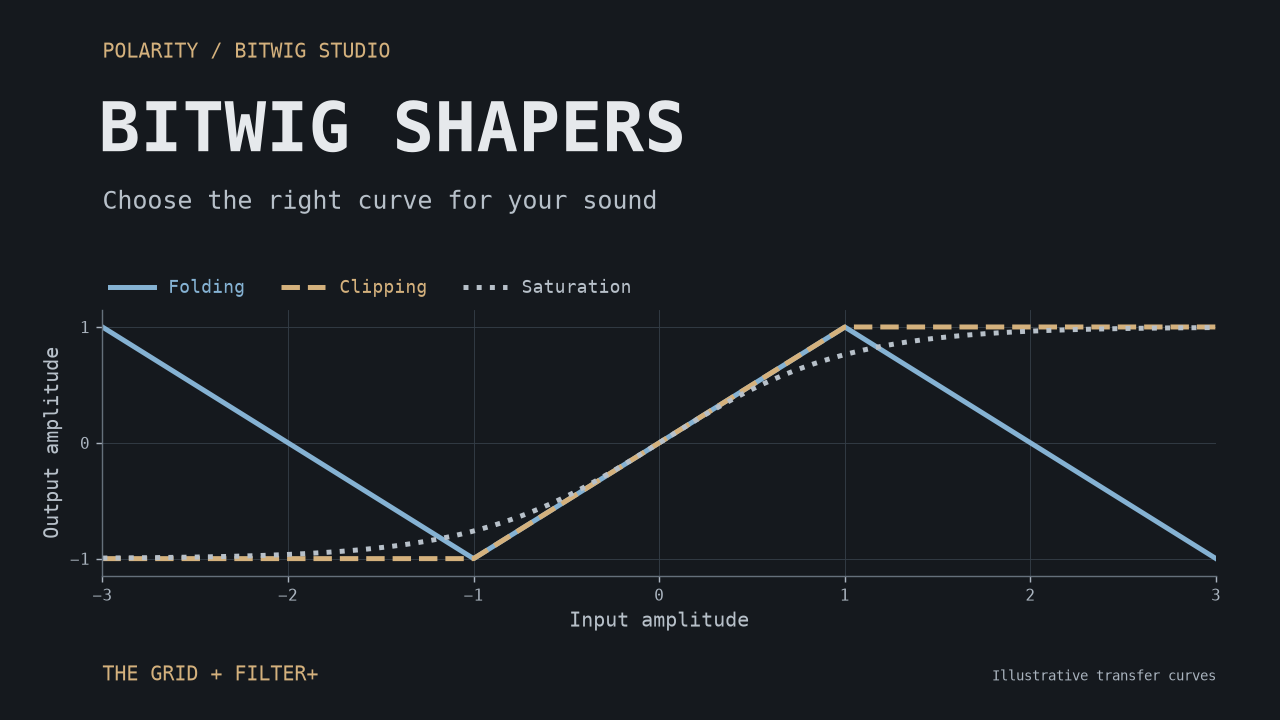
The core of the saturator is the wave shaper, which uses a transfer function (represented by a yellow curve) to remap the input signal. This function alters the waveform, changing its shape to produce new harmonics and ultimately distortion. The wave shaper lets you visually and functionally dictate how your input waveform will be bent, clipped, or folded.
Visual Analysis with an Oscilloscope #
To help visualize what’s happening, I use a DC offset device and an oscilloscope. The DC offset acts as a simple generator, shifting the signal up and down and mimicking how a speaker cone moves. By modulating this offset slowly, I can clearly see on the oscilloscope how the saturator changes the waveform in response to input levels and different shape settings.
Understanding the Main Controls #
Drive and Threshold #
Increasing the drive raises the input signal, which means more of it reaches the non-linear (curved or clipped) part of the transfer function. As the signal hits these non-linear parts, the sine wave gets squashed or flattened, which corresponds exactly to the curve I set in the saturator.
Positive vs. Negative Ranges #
The transfer function affects both the positive and negative halves of the audio waveform. In the display, there are yellow and orange lines for each range, but in the central display, these are overlapped. This means I can adjust the shape of the signal independently for both positive and negative values, using threshold skew and knee controls to determine how soon and how harshly the wave breaks in either range.
Wave Folding Explained #
I demonstrate wave folding by setting the curve so that, above a certain point, the waveform is not just clipped but actually folded back on itself. I liken this to folding a piece of paper, rather than extending naturally, the waveform bends back, creating a more complex, harmonically rich distortion.
Special Features: The Quiet Section #
Gating Quiet Signals #
The “quiet” section, which affects the area around zero (quiet parts of the signal), works almost like a noise gate. By reshaping this part of the curve, I can force the signal to drop instantly to silence rather than fade naturally. This can be useful on noisy synths, drums with reverb tails, or bass sounds where I want to cleanly gate the reverb while still adding distortion.
Practical Audio Demonstrations #
Noise Removal and Gating #
By running real synths and drums through the saturator, I show how this gating effect can completely remove noise or shorten drum tails. This is great for cleaning up tracks and can even add creative effects to drums and basses.
Distortion and Harmonics Generation #
Switching to test tones and kick drums, I illustrate how the saturator adds harmonics to a pure sine wave. These new overtones make drums and basses sound “fatter” and more present, especially useful for helping kick drums cut through on smaller speakers or in a dense mix.
Output Compensation and Filtering #
The drive control is linked with an output compensation feature, so as I push the input harder, the saturator lowers the output to avoid unwanted volume jumps. Additionally, there is a built-in filter that lets me tame the upper frequencies created by distortion, keeping things musical and controlled. I also show that the filter’s character can be changed (gentler or more pronounced), depending on taste.
Conclusion: Practical Tips and My Approach #
Ultimately, I see the saturator as a versatile tool for both creative sound design and practical mixing. It creates harmonics, fattens up drums and bass, and can simultaneously gate noise or tails, saving time and adding character. While I am primarily a musician rather than a technician, I try to explain these concepts in clear terms and encourage viewers to comment with corrections or requests for future tutorials.
Further Explanation: Core Concepts #
Harmonics vs. Harmonics #
When I say harmonics (not harmonies), I’m talking about the overtone frequencies that are mathematically related to the original signal, these are what make distorted or saturated sounds richer and more complex.
Clipping, Soft Clipping, and Folding #
- Clipping: The waveform is forcibly cut off at a certain threshold, creating harsh harmonics (like in hard digital distortion).
- Soft Clipping/Knee: The waveform bends gently before flattening, resulting in “smoother” distortion (less harsh, more musical).
- Wave Folding: Instead of staying at the clipped threshold, the waveform is inverted back on itself, which creates an even more complex harmonic structure.
Noise Gate vs. Saturation #
Most gates work by muting quiet signals; here, the saturator can mimic this by sharply reshaping how quiet signals transition to silence, while also adding harmonics and warmth when the signal is loud.
Call to Action #
I conclude by inviting questions, corrections, and tutorial requests from the audience, and encourage viewers to like, subscribe, and comment with ideas for future videos.
Full Video Transcription #
This is what im talking about in this video. The text is transcribed by Whisper, so it might not be perfect. If you find any mistakes, please let me know.
You can also click on the timestamps to jump to the right part of the video, which should be helpful.
Click to expand Transcription
[00:00:00] I thought maybe for today's video we dive into the saturator of Bitwig studio because for me and maybe also a lot of people
[00:00:07] It's not really clear what it does exactly to the signal and we try and find this out in this video and
[00:00:13] Yeah, I would say let's go
[00:00:16] So this is how the saturator looks like in Bitwig studio and at the title
[00:00:21] It says saturator destruction and for me also all these devices are basically just distortion devices
[00:00:27] And I mean devices like fast or overdrive tape saturation and saturation, of course
[00:00:33] It's just creating harmonies or harmonics
[00:00:37] not harmonies harmonics
[00:00:39] above your root signal and
[00:00:42] Yeah, create this kind of distortion sound in a more or less the same way
[00:00:47] and
[00:00:50] At the bottom here it says wave shaper and the wave shaper is basically where you send a signal to a kind of a transfer function
[00:00:57] Which is represented here by this yellow line and you can alter this line and can send the wave form or your signal
[00:01:04] Onto a different path which creates then or results in a different wave shape
[00:01:09] And this is why it's called wave shaper and I can show you this here in a minute with the oscilloscope here
[00:01:16] You can also make this a bit bigger so you can see it pretty clearly on the screen. Yeah, nice
[00:01:22] And we have your DC offset device on the left side and DC offset device basically just creates positive and negative
[00:01:30] values and
[00:01:33] if you modulate this here at audio rate it basically creates a sound and
[00:01:38] This is also
[00:01:40] Representing what your speaker cone or your membrane at your speakers are doing so when you have the slider here at positive
[00:01:47] Range you basically move your speaker cone or membrane out and when you're on the negative range
[00:01:54] You're moving it back in and if you do this
[00:01:56] pretty fast at audio rates, then you create a signal and
[00:02:00] for this experiment you're basically I just used an LFO with super slow
[00:02:06] speed so we can analyze what's what's happening with the signal and
[00:02:14] Can also see that we have here a transfer function on the saturator and it's basically doing nothing
[00:02:20] We have you just a rounded edge at the top
[00:02:22] But it's not affecting the signal at all because it's not loud enough to reach this
[00:02:26] This curve here. So when we bring up here the signal maybe more and
[00:02:31] see then
[00:02:34] the signal is becoming a
[00:02:37] Bit flat at the at the top and barely notice it. It's not it's not that visible. Maybe you make this a bit slower
[00:02:46] Up it we can analyze better and also see out here in the bottom
[00:02:54] So we basically change now here the yellow line bring this down so all
[00:03:07] What this does is a threshold. So we apply this curve here basically
[00:03:12] Early on so the signal doesn't need to be that loud to be on
[00:03:17] Or is affected by that and you can see here now our clean sine wave becomes like an
[00:03:24] rounded squary wave form
[00:03:27] This is exactly what this
[00:03:31] Linear represents
[00:03:33] When we go to a certain loudness or to a certain
[00:03:37] Value point here. We bring the wave form to a rounded edge or to rain
[00:03:43] Rounded a path here and then we go to a straight line and you can see it's a straight line and the edges are rounded
[00:03:50] So that's exactly what we dialed in and you can see also that this is
[00:03:55] Applied to the negative range. So we have your zero line in the middle and
[00:04:00] This is applied to the positive range and to the negative range of the signal itself
[00:04:06] So when we look here at the saturator, you can see we have a display at the left side here
[00:04:11] Where we have an orange line and the yellow line and the yellow line is is the positive range and the orange line
[00:04:17] Is the negative range but in this display
[00:04:20] We only have a yellow line and the reason for that is that this one
[00:04:25] This line here is basically the negative and the positive range at the same time displayed on the same display on the same line
[00:04:32] So as you can see we go on the back in the negative range and it goes back up here and when we go
[00:04:38] Or now it's to the negative range then it goes also back up. It's basically positive negative positive negative and
[00:04:47] Yeah, it's pretty much hard to get in in the brain how it works
[00:04:53] but if you look here at the
[00:04:55] Graph at the left side you can see it's much more much easier to get
[00:05:01] But then again we can change
[00:05:06] how the
[00:05:08] Wave shape of the saturator behaves in the negative range differently from how it behaves in the positive range and
[00:05:14] We have these knobs here at the right side and it says
[00:05:20] Loud threshold skew which basically changes how the signal behaves in the negative range as you can see we have now here
[00:05:27] Our orange line so we can say we want to have this transfer function happening
[00:05:33] Earlier on in the negative range then in the positive range and you can see it is also displayed here in the
[00:05:39] in the oscilloscope, maybe we have to wait until it's it moves beyond my
[00:05:45] my
[00:05:49] Cam here, but you can see here the positive range is the same as before
[00:05:53] But in the negative range we break earlier on to us into a straight line then in the positive range
[00:06:00] So you can alter how the saturator behaves in the negative range then in the positive range
[00:06:06] We can also change here than the knee which makes the the breakdown even harder
[00:06:14] And you can see it changes the positive in the negative range at the same time so these knobs are basically only
[00:06:21] knobs to
[00:06:23] dial in the difference
[00:06:25] What you want to have different in the negative range than in the positive range there are not kind of absolute
[00:06:31] Values you can dial in it's relative to what you dialed in on these big knobs here
[00:06:38] Then we have here
[00:06:42] also this one here where we can kind of go back to
[00:06:47] negative and this is called I think maybe
[00:06:51] Write it in the comments if I'm wrong here, but this is called folding
[00:06:56] Because maybe go back here to this
[00:07:01] Because you can see it already on the graph
[00:07:04] You take the signal above this line or above this point
[00:07:09] Maybe I freeze this down here above above this this point here
[00:07:12] And instead of letting the signal pass and go into a nice arc here back to this point
[00:07:18] You fold it back onto itself. It's like
[00:07:22] It's like a piece of paper
[00:07:27] It's like a piece of paper like this one here and then you take the edge and
[00:07:37] fold it back
[00:07:39] Onto itself like this. This is why it's called folding more or less
[00:07:43] That effort instead of having this waveform this edgy thing you are peeking out you bring it back down to this and
[00:07:51] This is also why it's called way folding
[00:07:58] Okay, so we have this and we can also change of course how it behaves
[00:08:04] Maybe in the negative range, so we have folding at the positive range
[00:08:08] And we have no folding at the negative range. Maybe remove the freeze here
[00:08:13] So now we should see this folding only happening down here and at the top it should be pretty fine
[00:08:22] Or it's exactly opposite now, okay
[00:08:26] I
[00:08:28] Put it this way
[00:08:39] Oh, yeah, now we have to folding at the orange part here, which is which is down here
[00:08:51] And at the top we have
[00:08:54] Still the rounded sine wave letting completely pass without alteration
[00:08:59] Okay, that's basically the simple explanation for this
[00:09:06] for this graph here and
[00:09:09] there's also these three knobs here, which is called quiet and
[00:09:13] This is called quiet because it only applies to
[00:09:17] this
[00:09:20] Bottom area here and the bottom area are basically all the values
[00:09:25] Below a certain point and if we look at here at this graph here at the top
[00:09:31] We basically just
[00:09:34] Apply changes to this area here around the zero line
[00:09:38] So the quiet parts and if you do stuff like this here
[00:09:41] you
[00:09:46] Be something like this. It's almost like you
[00:09:49] Create an gate a noise gate where you filter out everything
[00:09:54] or you instead of letting here this the signal to die out slowly and
[00:10:00] Letting it die out into to the quietness you bring it straight down to zero
[00:10:06] which then if
[00:10:09] Results in a gate effect or you remove the signal completely in an instant
[00:10:15] So maybe we use some real sounds and try out how this works in the real life
[00:10:19] so
[00:10:23] For instance, I could use here and
[00:10:25] Pull the synth and the pulley synth has some noise and they can show you how this works with the gate
[00:10:32] I just explained here. Maybe get rid of here some
[00:10:35] Just just these parts. Okay, so we have noise dealt in
[00:10:40] Thank you
[00:10:44] You
[00:10:46] Can hear can remove the noise completely
[00:10:57] Just using all these everything that's below this point is basically completely muted
[00:11:13] And this is nice when you have maybe some drums, maybe let's see if I can find you some
[00:11:22] Some real real drums. Oh, yeah, this is nice
[00:11:30] So switches to an audio track, okay, can you read?
[00:11:38] I
[00:11:40] Can completely remove some of the tails of the drums
[00:12:04] But it also introduces some some kind of noise at the edge or probably
[00:12:24] And sometimes this also nice on bass sounds
[00:12:39] where you have a big fat bass sound and you have reverb on it and you want to cut out the reverb but also want to have
[00:12:47] distortion so you can
[00:12:50] basically do it in one step and
[00:12:53] Maybe you can show you this here in a minute
[00:12:55] So maybe we use a phase four
[00:12:59] Make some bass
[00:13:03] Okay, and then you put reverb on it
[00:13:21] And then you use this the saturation device and then you
[00:13:28] See a hot hot cut
[00:13:34] And then you can remove some of these reverb sounds
[00:13:47] And
[00:13:49] The difference here is when you you remove this
[00:14:06] Slowly dying out and yeah, you can cut it off
[00:14:11] So
[00:14:13] It's kind of an gate effect and in distortion or overdrive effect at the same time, so this is pretty handy sometimes
[00:14:25] And of course is when you use drums like we did here use the real drums
[00:14:32] And instead of gating we can also apply here nice rounded edge at the top
[00:14:41] You can see when I use it to drive I basically raise the input volume
[00:14:58] Of the signal going into the saturator and it changes here also the curve because the
[00:15:05] Scaling of the curve is then a bit different
[00:15:09] Because if you make it louder, then of course this curve here is in a different scale to the input signal
[00:15:22] And we can also see here that when you have this linked on it
[00:15:26] Saturator tries to compensate for your input gain on the output. So when you
[00:15:31] basically
[00:15:33] Raise the input you lower that out the output
[00:15:37] Okay
[00:16:00] Okay, so speaking about harmonics. I have your test tone which creates a clean sine wave
[00:16:07] So there are no harmonics, it's just one frequency and when we bring in here the saturator
[00:16:15] You can see the white line is at this position here when we change the gain of the test tone
[00:16:21] We can change the white line. We can also use the drive to raise the input signal
[00:16:27] Maybe bring this bit down here make a hard knee
[00:16:35] And then we kind of create harmonics from this single sine shape here
[00:16:55] You can also see how does the odd and even harmonics changing differently
[00:17:00] They've also got a slow pass fit, but we just only apply it to the
[00:17:09] Saturated signal we can tame the overtones or the other harmonics a bit here bring them down and
[00:17:17] there's also that you can change at the filter type and
[00:17:22] I would advise you to click to
[00:17:26] Select a device hit F1
[00:17:29] then look at
[00:17:32] The modes here and you can see a steepness pole count of the low-pass filter g-modes are gentler and our modes are a bit bumpier
[00:17:40] Again try out different
[00:17:42] different settings here for the low-pass filter and
[00:17:45] Play around a bit and you know find the sweet spot for your current sound
[00:17:52] But in general
[00:17:54] You create overtones and you have to be aware of it and sometimes when you have a super clean sound like a bass drum
[00:18:00] And it sounds alone and
[00:18:02] Yeah, not not that fat then you use in saturator it creates overtones and then you have this much much richer sound in the end
[00:18:10] Maybe I can use your kick drum
[00:18:13] Show you this maybe
[00:18:20] Kick e-kick. Yeah, so let's remove this
[00:18:27] Loop this
[00:18:36] So nothing happens to the kick sound
[00:18:48] It's like a sign
[00:18:54] Sign wave hitting just one frequency more or less
[00:19:00] And then you add harmonics with the saturator it sounds more fat and present
[00:19:11] I
[00:19:13] I
[00:19:15] Be fast
[00:19:42] So you can
[00:19:44] Completely change the tonality of your kick drum make it more fat and if you think about
[00:19:50] listening to kick drums on small speakers or small ear buds or headphones
[00:19:56] You need these overtones to make the listener aware that there is actually a kick drum somewhere in your mix down and
[00:20:03] Also on bigger speakers, it's much much better to have some of the harmonics to
[00:20:11] Make the brain notice that there is something below there
[00:20:14] So that's basically my version of how the saturator rocks or how I think it works and
[00:20:21] You can still see I'm mostly a musician not a technician
[00:20:24] I'm also not a developer. So I try to explain it in simple words if you have some
[00:20:31] If you have some questions about it or maybe some corrections, then please leave it in the comments
[00:20:37] Also leave a like if you like the video and if you want to stay up-to-date, then please subscribe to the channel and
[00:20:43] If you have some hints, maybe at what I can do next
[00:20:47] Video wise or maybe tutorials for then also leave me some comments. It's always helpful
[00:20:54] So thanks for watching and I'll see you in the next video. Bye
[00:20:58] , bye
[00:21:00] Outro Music