Posts tagged with bitwig-guides
Here you can find a listing of all posts with the tag bitwig-guides on my page.

Feb 03, 2026 Bitwig Guide
The AD envelope module in Bitwig Studio's Grid is a versatile tool for shaping sounds, offering attack and decay controls with multiple modes, analog, relative, and digital, that affect timing and curve behavior. It can be triggered in various ways, looped for LFO-like effects, and used together with other envelopes for complex sound design, such as crafting kick drums. The AD module stands out for its simplicity and flexibility compared to more complex envelope modules, making it a go-to choice for quick and effective sound shaping.

Jan 27, 2026 Bitwig Guide
The organ device in Bitwig Studio is a simple additive synthesizer that allows you to stack up to nine sine wave partials using sliders, offering pitch, glide, attack, release, gain, and panning controls. While it is not designed to emulate traditional organs, its easy layout and oscillator model options make it versatile for creating pad sounds, bass lines, and experimental textures, especially when combined with modulators and voice stacking. Despite its age and simplicity, it remains a useful tool for creative sound design within Bitwig Studio.

Jan 22, 2026 Bitwig Guide
The Filter+ device in Bitwig Studio is a highly versatile and modular audio effect combining distortion and filtering, allowing users to shape and enhance sound in creative ways. It offers extensive customization, from swapping distortion and filter modules to flexible modulation options using built-in or external modulators, and even supports polyphonic processing for advanced sound design. With features like pre- and post-FX slots and the ability to convert to an FX grid for deep editing, Filter+ stands out as a powerful tool for everything from subtle coloring to building complex resonators and synthesizers.

Jan 21, 2026 Bitwig Guide
Bitwig Studio's lookup tables in the Grid are versatile modules that map input values (like a phase ramp from a phasor) to corresponding output values based on predefined waveforms, such as sine, triangle, saw, or pulse, enabling highly flexible sound shaping and audio-rate manipulation. These modules work similarly to oscillators but are more modular and allow for precise control, including user-defined arrays and window functions for volume or waveform shaping. By routing different signals or modulating parameters, you can use lookup tables and related modules creatively for tasks ranging from wave shaping to arrangement automation, making them powerful tools for custom sound design within Bitwig.
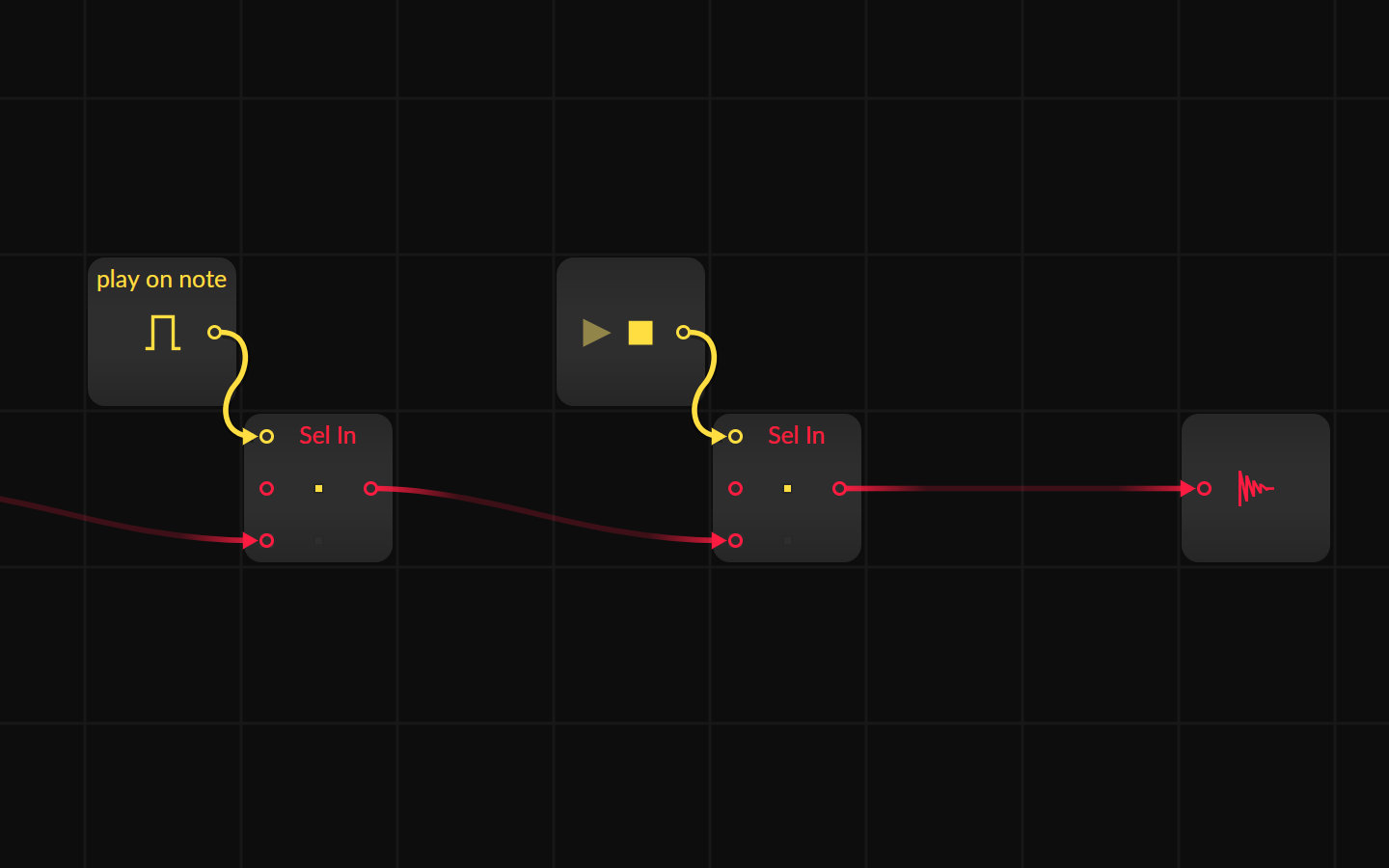
Jan 05, 2025 Bitwig Guide
Sometimes you create a generative, self-running Grid patch and want it to stop or play at specific times. Here are some solutions to stop the grid from playing or stop the audio output with gate informations from the piano roll or the transport module.
Jan 05, 2025 Bitwig Guide
Here all a collection of super short ideas what you can do with Bitwig

Jul 24, 2023 Bitwig Guide
You can easily copy all modulation routings and their specific amounts from one modulator to another in Bitwig by right-clicking the modulator handle, selecting copy, and then pasting it onto a new modulator. Similarly, you can synchronize parameter values or modulation mappings across all layers by right-clicking a knob and choosing either copy value to all layers or copy modulation to all layers. For multiple modulators, hold Alt to select them, then drag with Control to move or duplicate them while retaining or copying all their mappings, streamlining complex modulation setups.

Apr 17, 2023 Bitwig Guide
The Transfer module in Bitwig 5 is a flexible, drawable wave shaper that lets you edit custom transfer functions to shape and distort audio or other signals in creative ways. It features intuitive options like antialiasing for smoothing, drive control for input gain, and the ability to load or design complex wave shaping curves. Perfect for personalizing distortion effects, it gives you precise control to craft everything from subtle saturation to wild custom transformations.

Apr 14, 2023 Bitwig Guide
KeyTrack Plus allows you to create custom modulation curves by mapping keyboard notes to modulation values using a simple graph interface, where each key's position is visually represented. You can easily adjust the modulation amount globally and draw unique curves to control how parameters like cutoff respond to different keys, enabling highly expressive modulation. This flexible system lets you apply nuanced or unconventional modulation to any input, making creative sound shaping straightforward and intuitive.

Apr 13, 2023 Bitwig Guide
Segments is a versatile multi-stage envelope generator that lets you freely draw custom shapes, define sustain phases, and choose from multiple play modes like one-shot, hold, repeat, and ping-pong. It features flexible time settings synced to project tempo, smoothing options, polyphonic or monophonic operation, and easy shape manipulation with copy, paste, and snap features. This tool can be used at both standard and audio rates for advanced modulation possibilities, making it perfect for creating unique envelopes in any sound design workflow.

Apr 12, 2023 Bitwig Guide
The Curves LFO is a customizable LFO that allows you to draw your own modulation shapes, synchronize them to tempo, and fine-tune settings like smoothing, retriggering, and polarity for precise control. You can edit the shape grid, snap points to rhythm divisions, save and recall curves, and apply modulation to synth parameters such as filter cutoff, supporting both monophonic and polyphonic modes. Its versatility enables you to create dynamic, rhythmically synchronized modulations and unique sound design movements, all fully integrated with your project’s groove and timing.

Apr 11, 2023 Bitwig Guide
The Wavetable LFO in Bitwig Studio lets you swap traditional LFO waveforms for wavetables, allowing for fluid modulation between shapes like sine, triangle, saw, and square, and offering advanced options like polyphonic mode, bipolar switching, and synchronized timing. This modulator can control various parameters or even act as an oscillator, especially when paired with pitch-tracking and phase options for creative sound design. You can layer multiple Wavetable LFOs on any device for unique and complex results, making it a powerful tool for both modulation and synthesis.

Apr 03, 2023 Bitwig Guide
The Bitwig Studio peak limiter is a simple, low-latency tool designed to control audio peaks and prevent signals from exceeding 0 dB. It features intuitive visual displays for input, output, and gain reduction, with easy controls for input gain, ceiling, and release time to tailor its response to different types of sounds. While not the most advanced limiter, it is highly practical for managing unpredictable audio and increasing volume safely in any project.

Mär 10, 2023 Bitwig Guide
Delay One in Bitwig Studio is a versatile device that allows you to offset incoming audio in sync with your BPM or manually in milliseconds, with flexible controls for feedback, filtering, and mixing. It can function as a simple delay, echo, looper, or even create glitchy and reverb effects by using the feedback FX chain to process and alter the sound in creative ways. This makes Delay One a powerful tool for offsetting audio, crafting evolving patterns, and experimenting with sound design during both production and live improvisation.

Mär 07, 2023 Bitwig Guide
The Bitwig Studio pitch shifter can shift live audio up or down by up to 12 semitones and features controls for pitch amount, grain size, and blend between dry and wet signals. Its unique grain control lets you create effects from metallic comb filtering to granular delays, making it a powerful tool for creative sound design rather than traditional pitch correction. The device excels when used in combination with other effects like reverb and delay, or in parallel processing chains, to add texture and innovative modulation to your audio.

Mär 03, 2023 Bitwig Guide
The Bitwig Studio Test Tone device is a versatile tool that generates various sounds like sine, triangle, square, saw, white noise, pink noise, and direct impulses, making it ideal for testing speakers, effect chains, or system setups. Clever use of modulation and containers allows you to transform it into monophonic or polyphonic synthesizers, customize sound shaping with macros and envelopes, and even create impulse responses for convolution effects. Additionally, the Test Tone can be creatively combined with devices like ring modulators for unique sound design possibilities.

Mär 01, 2023 Bitwig Guide
The audio receiver in Bitwig Studio allows you to inject and blend audio from other tracks at any point in your effects chain, providing flexibility to creatively combine and manipulate audio. You can add effects, adjust gain, and automate mixing, even on instrument tracks that are typically for MIDI instruments. By using devices like Chain and modulators such as Pasek Eight, you can sequence, shuffle, and switch smoothly between multiple audio sources for dynamic and rhythmic sound design.

Feb 28, 2023 Bitwig Guide
The DC Offset device in Bitwig Studio is a simple tool designed to correct DC offsets in audio recordings but becomes much more powerful with modulation, enabling creative sound design techniques like custom synthesizers, saturation, and bit-crushing effects. By converting audio signals into modulation sources, users can reshape, process, and reintroduce signals in unique ways, utilizing the full range of Bitwig modulators. This foundational device, while basic in concept, opens the door to a variety of experimental audio effects and advanced signal manipulation.

Dez 09, 2022 Bitwig Guide
The convolution device in Bitwig Studio acts like an Instagram filter for your audio, using impulse responses to place your sounds into different acoustic spaces or through sampled devices. You can customize the effect with controls for tuning, EQ, pre-delay, envelope shaping, stereo width, and mix between dry and wet signals. This lets you easily give your sounds unique textures, from realistic room ambiances to creative effects, simply by loading different impulse responses.

Nov 22, 2022 Bitwig Guide
The Bitwíg Studio frequency shifter lets you move all frequencies of a sound up or down by a chosen number of hertz without affecting pitch, with additional controls for the stereo spread and wet-dry mix. It is especially useful for drums, where it can add punch, a stereo feel, or create interesting top-end layers without altering the whole sound. While the effect shines on percussive elements, its use on tonal sounds is limited but can still be creatively explored.

Nov 22, 2022 Bitwig Guide
The De-Esser in Bitwig Studio acts as a simple compressor targeting high frequencies to tame harsh sounds, with controls for cutoff frequency, filter slope, and gain reduction amount. It lets users monitor what frequencies are being analyzed and adjust how much harshness is reduced, making it especially useful for vocals and elements like hi-hats or cymbals. By adjusting parameters, you can easily control and diminish harshness in selected frequency ranges, giving your mixes a smoother sound.

Nov 18, 2022 Bitwig Guide
The Comb-Filter in Bitwig Studio is a visual comb filter with flexible frequency and feedback controls that can add metallic physicality to synth sounds, making them resemble real instruments like a kalimba or guitar. Unlike other devices, it lacks automatic gain compensation, so users should use a limiter to avoid clipping, and its mix knob allows blending the dry signal. While key tracking can be tricky due to logarithmic scaling, using the Comb-Filter within Bitwig’s FX grid simplifies this by allowing direct frequency-to-key mapping.

Nov 17, 2022 Bitwig Guide
The Blur device in Bitwig Studio uses All-Pass delays on both left and right channels, allowing you to control both delay time and feedback through interactive dots for creative sound shaping. The feedback parameter uniquely blends feedback gain and dry signal, with 0 percent giving only the delayed signal and 100 percent giving only the dry signal, making it possible to find sweet spots for blending effects. This setup is ideal for creating reverb and stereo widening effects, smearing or blurring the signal for rich spatial textures.

Nov 16, 2022 Bitwig Guide
The Bitwig Studio tool device features two volume knobs for backward compatibility, allowing for fine control with overlapping dB ranges and the option to boost volume further using both. It provides panning and a width knob, enabling users to adjust stereo width from mono to very wide by manipulating the mid and side channels. Additionally, users can invert the polarity of left or right channels and swap stereo channels for more flexible audio manipulation.

Nov 10, 2022 Bitwig Guide
The Bitwig Studio reverb is divided into early reflections for simulating room characteristics, late reflections for controlling the decay and frequency of the space, and an output section for blending the wet and dry signals, as well as adjusting stereo width. Unique features like wet FX and tank FX allow creative manipulation by adding effects either to the wet output or within the feedback loop, drastically shaping the reverb's sound and character. By tweaking parameters such as diffusion, room size, and feedback processing, you can achieve anything from subtle room ambiance to complex, experimental effects.

Nov 07, 2022 Bitwig Guide
In this video, I explore Bitwig Studio’s Saturator device, explaining how it shapes audio signals using a customizable transfer function to add harmonics and distortion. I demonstrate its impact on waveforms, different settings, and real sounds, highlighting features like gating, wave folding, and the importance of harmonics for adding richness to audio. The video offers a practical guide for musicians to better understand and creatively use the Saturator in music production.

Sep 06, 2022 Bitwig Guide
In this tutorial, I explain how the Array (Recordable Lookup Table) module works in Bitwig Studio 3.2 by demonstrating how it stores and plays back audio data, similar to a digital tape recorder. By using envelopes and LFOs to control the read and write phases, you can create a range of effects like pitching, bit crushing, and even realtime audio reversing. The Array module is a versatile tool for creative sound design, and I encourage you to explore its many possibilities.

Aug 31, 2022 Bitwig Guide
The Steps module in Bitwig Studio 3.2, now with interpolation mode, looks similar to a multi-stage envelope generator but is more limited, as you can only interpolate between steps without flexible curve adjustments or additional point insertion. Despite these limitations, the Steps module is highly versatile and can be used as a drawable oscillator, for wavetable synthesis, phase modulation, and inventive sound design when combined with other Grid modules. The video demonstrates creative ways to use the Steps module within musical contexts, emphasizing the limitless potential of combining Grid devices in Bitwig Studio.

Aug 30, 2022 Bitwig Guide
The Zero Crossings module in Bitwig Studio's Grid is a simple pitch estimator that measures the distance between zero crossings of an audio waveform to determine pitch or frequency, working best with simple signals like sine waves. Filtering options, both inside the module and externally, help make complex signals easier to analyze for more accurate pitch detection. While not precise for complex audio, it is a handy tool for generating pitch signals from audio input, which can then be processed or quantized further within Bitwig.

Aug 29, 2022 Bitwig Guide
This video thoroughly explains the Scaler module in Bitwig Studio's Grid, demonstrating how it controls and manipulates phase signals to change synchronization speeds, trigger devices, and shape audio creatively. It highlights practical uses such as altering playback speed, creating polyrhythms, wavefolding audio, and deterministic modulation of multiple parameters with one knob. The tutorial also shares useful tricks and encourages viewers to experiment, ask questions, and explore further possibilities with modular approaches in Bitwig.

Aug 26, 2022 Bitwig Guide
This video explains the Recorder module in Bitwig Studio's Grid, showing how it acts as a simple in-memory buffer for recording and playing back audio in real-time, with no permanent storage or advanced controls like speed or offset changes. The tutorial explores creative uses of the module by combining it with logic tools such as gates, latches, quantizers, and random triggers to achieve effects like glitching, ghost notes, and dynamic filtering, especially on drum loops. The presenter emphasizes experimenting with different signal routings and highlights that layering logic around the Recorder can unlock highly creative possibilities for rhythmic and textural manipulation.

Aug 25, 2022 Bitwig Guide
This video explains how basic math operations like addition and subtraction are used in audio signal processing within the Grid, demonstrating concepts like DC offset, phase alignment, and volume changes by combining oscillators. It also shows how these operations relate to common audio tasks such as mixing, phase inversion, and extracting mid-side information from stereo signals. While the tutorial uses the Grid, the principles discussed apply broadly to audio programming and signal processing in various environments.

Aug 25, 2022 Bitwig Guide
This video explains the logic modules in Bitwig Studio's Grid, focusing on their basic binary operations and how they can be creatively used in signal processing, sequencing, and audio manipulation. The presenter demonstrates essential modules like buttons, triggers, gate repeat, comparators, and logic gates, highlighting that their power comes from flexible combinations within patches rather than complexity. Practical examples show that while each module is simple on its own, their true potential shines in creative setups, enabling unique and unexpected results.

Aug 22, 2022 Bitwig Guide
The video explains how the all-pass device in Bitwig Studio works by passing all frequencies while introducing delay, phase diffusion, and metallic ringing sounds, which are essential for building reverbs and creative sound effects. It demonstrates how the device can be replicated in Bitwig's Grid and discusses its use in artificial reverbs, where many all-pass modules are combined in parallel or sequential arrangements. The creator recommends exploring Valhalla DSP's blog for deeper insights into reverb design using all-pass filters.

Aug 15, 2022 Bitwig Guide
Polyphony in Bitwig Studio lets you control how many notes or voices a synth can play at once, with options for monophonic and polyphonic modes, each affecting envelope behaviors differently. Voice stacking multiplies each note by several layers or "stacks," allowing you to uniquely shape sound by applying modulators to different stacks for more movement and detail. This powerful system works not just on instruments but also in device grids and effects, making Bitwig's modulation and sound design extremely flexible and creative.

Aug 10, 2022 Bitwig Guide
The Vector 4 modulator in Bitwig Studio lets you morph between different modulation targets by moving a dot between four corners, each representing a unique modulation setting, applying modulation in a non-linear, logarithmic fashion. You can lock movement to one axis and even automate the position with other modulators, allowing for powerful and expressive sound design options. The Vector 8 modulator works the same way but offers eight modulation points for even more flexibility in morphing between complex sound presets.

Aug 08, 2022 Bitwig Guide
The Steps modulator in Bitwig Studio is a versatile tool allowing you to create and manipulate sequences for modulation with features like step painting, shape generation, randomization, and uni/bipolar modes. It offers flexible playback options including forward, backward, ping-pong, looping, synchronization to transport or groove, and even per-voice polyphony, while supporting advanced audio-rate and pitch-based modulation. Its ability to draw custom modulation curves and integrate with note effects and other Bitwig devices enables quick creation of dynamic, rhythmic, or melodic modulation patterns that can be both random and predictably repeatable.

Aug 04, 2022 Bitwig Guide
Select-4 in Bitwig Studio is a morphing modulator that allows you to smoothly transition between four different modulation setups using a single slider, enabling dynamic sound changes and creative modulation stacking when the fill mode is activated. Each point on the slider corresponds to different modulation handles, letting you apply unique parameter changes to your synth and effects for each stage, while also allowing automations or step modulators to morph between these variations. This makes Select-4 a versatile tool for creating evolving, preset-like transformations and rich sound design possibilities.

Aug 03, 2022 Bitwig Guide
A sample and hold modulator takes an input signal, samples its value at selectable intervals, and holds that value for a specified duration before outputting it as a stepped signal. This tool allows for precise control over when and how often new values are sampled, making it useful for creating quantized or stepped modulation sources and can operate polyphonically for individual voices. It also offers various restart and time base options, allowing for synchronization with musical timing, manual triggering, or voice-specific modulation.

Aug 02, 2022 Bitwig Guide
The Random LFO modulator in Bitwig Studio is a versatile tool that can generate unique, polyphonic or monophonic random modulations for parameters like cutoff, panning, and pitch, enabling each note or voice to have its own character. Its flexible controls allow you to adjust speed, smoothness, feedback, and trigger modes, letting you create anything from subtle variations to drastic, evolving changes over time. By fine-tuning its settings, you can easily add movement, analog feel, or rich unpredictability to your patches, transforming static sounds into dynamic, expressive ones.

Aug 01, 2022 Bitwig Guide
The ramp modulator generates a ramp signal from zero to one over a set time frame, which can be synced to your project tempo and set to loop or trigger once, functioning as either an LFO or an envelope. It allows for both polyphonic and monophonic modes, with options for adjusting modulation amount, curve, and direction, and can be set to only retrigger shapes under certain conditions. This flexible modulator is particularly useful for creative modulation, synchronizing playback positions in step sequencers or samplers, and stretching audio loops to match your project’s tempo.

Jul 29, 2022 Bitwig Guide
The quantized modulator in Bitwig Studio allows you to shape any input modulation signal by setting the resolution, effectively dividing it into a chosen number of steps. You can also adjust how these quantized levels are distributed across the modulation range, with options for linear, logarithmic, exponential, or sine-based distributions for different creative effects. This tool is versatile for quantizing various signals and can be used, for example, to map modulation precisely to note scales.

Jul 28, 2022 Bitwig Guide
To create a multi-sampler patch in Bitwig Studio, set up clips for each key and velocity layer you want to sample, then bounce these clips to audio files with clear naming conventions for easy organization. Once all samples are exported, drag them into Bitwig’s sampler, sort by file name, and manually assign velocity and key ranges for accurate mapping. Save this project as a reusable template, making it quick and efficient to sample any device or instrument in the future.

Jul 26, 2022 Bitwig Guide
The Pitch-12 modulator is a node-driven tool that lets you assign unique modulation parameters to every key in an octave, triggered either by MIDI input or node clips. Each key acts as an on-off modulator, and you can fine-tune behaviors using adjustable lag for smoothed transitions and a global modulation amount for overall control. This allows for diverse, customizable textures and sound variations linked directly to your melodies or chord progressions.

Jul 26, 2022 Bitwig Guide
Parsec-8 in Bitwig Studio is an 8-step bipolar sequencer modulator with individual step disabling, holds, and output handles for each step, offering flexible modulation and creative playback options, including phase offset, smoothing, speed control, and direction modes. Unique to Parsec-8, each step can be modulated independently, with playback synced to transport, free-running, or even driven by note or pitch inputs, enabling advanced rhythmic and sound design possibilities, from stepped LFOs to monophonic synths. The device supports intricate timing adjustments, groove integration, and real-time musical manipulation, making it a versatile tool for dynamic modulation and draw-your-own oscillator shapes.

Jul 18, 2022 Bitwig Guide
The Note-Sidechain modulator allows you to use MIDI input or note clips to modulate parameters like volume or filter cutoff, making it perfect for tasks like ducking a bass to a kick drum. You can easily route MIDI from any channel and customize the envelope's timing, depth, and sensitivity, offering flexible control over your modulation targets. By saving the Note-Sidechain on a utility device as a default preset, you can quickly apply ducking across multiple tracks without repetitive setup.

Jul 15, 2022 Bitwig Guide
To perfectly sync a drum loop in a sampler to your project tempo, disable key tracking and velocity sensitivity to maintain consistent pitch and loudness, then trigger the loop on every bar instead of relying on loop mode to avoid timing drift. Use warp or stretch modes like textures with a synchronized ramp signal to modulate the playhead and ensure the drum loop follows the project tempo precisely. This method allows creative control over granular sound settings and makes it easy to slow down or speed up the loop while keeping everything in sync.

Jul 14, 2022 Bitwig Guide
The note counter modulator generates modulation signals by counting played notes, with customizable step amounts and increments, allowing for unique and asynchronous modulation cycles. Users can fine-tune the modulation's resolution, scaling (bipolar or unipolar), and per-voice behavior, resulting in a variety of complex poly-rhythmic and overlapping sequences. The output scaling also includes an absolute value mode, converting modulation steps directly into percentage values for precise control.

Jul 14, 2022 Bitwig Guide
The Mix modulator in Bitwig Studio allows you to crossfade between two values, A and B, which can be set to positive or negative amounts and used to modulate parameters like cutoff. You can also enable a per voice option to send different modulation values to each voice, making the modulation polyphonic and more dynamic. Additionally, combining it with other modulators like Random adds further versatility, allowing unique and expressive sound shaping for each note played.

Jul 12, 2022 Bitwig Guide
The MIDI modulator in Bitwig Studio allows you to control parameters using different MIDI data like CC, pressure, and pitch bend, and you can easily map knobs from your MIDI keyboard using the learn function. You can filter incoming MIDI data by channel, making it flexible for setups with multiple controllers, and you must disable the PB Expressions option for standard pitch bend usage instead of MPE. Additionally, the per voice option in the inspector enables independent modulation for each note played, unlocking creative sound possibilities when used with advanced MIDI controllers.

Jul 01, 2022 Bitwig Guide
The math modulator allows you to combine two modulation sources using various mathematical operations like multiply, add, subtract, minimum, maximum, and quantize, providing flexible ways to shape your modulation signals. You can control each input with knobs or modulate them further with sources like macros or LFOs, and the quantize option lets you set the resolution of your modulation in discrete steps. This tool is especially useful when you want to creatively process or combine modulation signals for unique sound design possibilities.

Jun 28, 2022 Bitwig Guide
The Macro 4 interface modulator combines four regular macro knob modulators into one compact, space-saving unit on the modulator front end. It offers familiar options like switching between bipolar and unipolar modulation and supports per-voice modulation settings. Aside from these conveniences, it functions just like four individual macro modulators.

Jun 27, 2022 Bitwig Guide
The Macro modulator allows you to assign a name, set a range from 0 to 100 percent, and morph between two different states of a synthesizer by modulating any parameter, even those nested within devices. You can switch between unipolar and bipolar modes and choose targets easily using the modulation handle, offering flexible sound shaping. This powerful modulator is especially useful for smoothly transitioning between presets or settings and includes per-voice modulation for added versatility.

Jun 24, 2022 Bitwig Guide
The LFO in Bitwig Studio offers unique features, including audio-rate modulation and pitch-following based on MIDI input, making it versatile for both sound design and sequencing. It provides flexible synchronization options, customizable wave shapes, delay and fade-in functions, as well as polarity, phase, and polyphony controls for deep creative modulation. With these powerful tools, users can shape sounds, create evolving sequences, and even build entire synthesizers using the LFO module.

Jun 23, 2022 Bitwig Guide
The Key-Track modulator adjusts modulation based on note input, allowing parameters like filter cutoff to follow keyboard note position, with C3 typically as the neutral center. By tweaking the center and spread, you can control how much and how quickly modulation changes as you play higher or lower notes, and the modulation works best on instrument tracks because they support note input. To apply Key-Tracking to audio tracks, a note receiver is needed to route notes from an instrument track, enabling features like key-tracked filters even on pure audio clips.

Jun 20, 2022 Bitwig Guide
The HV/CV-In input modulator in Bitwig Studio allows you to use control voltages from hardware like Eurorack systems to modulate parameters within Bitwig, such as synth cutoff, using audio signals as control sources. You can adjust smoothing and gain to fine-tune the incoming signal and select between DC or AC coupling based on your audio interface, making it versatile for hardware integration. This tool is particularly useful for bringing the expressive control of Eurorack modular setups directly into your digital music production workflow.

Jun 03, 2022 Bitwig Guide
The global modulator offers three handles, Fill, A/B, and Play, that let you modulate various device parameters based on different states, such as toggling fill, crossfading between A and B, or responding to the play button's state. These features allow for dynamic control, such as muting devices or adjusting filters, depending on whether you're in performance or mixing modes. Additionally, you can easily rename the modulator to keep your workflow organized.

Mai 31, 2022 Bitwig Guide
The Expressions modulator in Bitwig Studio allows you to control multiple sound parameters individually for each note using keyboard velocity, MPE controllers, or by painting modulation curves directly in the note clip. This per-note expression makes your music more dynamic and organic, as every note can have unique modulation for factors like filter cutoff, timbre, or detuning. Features like smoothing and relative note start add further control, ensuring your performance or programming feels alive and responsive.

Mai 09, 2022 Bitwig Guide
The Bitwig Studio Polysynth features two identical oscillators with flexible waveform shaping, unison, sync, blend operators, and the ability to blend with noise and modulate filter parameters. It offers robust filtering options, two envelope generators for amplitude and filter shaping, and extensive modulation and voice control for a highly customizable sound. Additional options and voice modes can be accessed through the inspector panel, providing versatile sound design capabilities.

Mai 05, 2022 Bitwig Guide
The Button Modulator is a simple tool that lets you instantly apply a preset value to parameters like cutoff or enable switches in your device or preset. You can assign labels and stack multiple buttons for cumulative effects, and use the smoothing option to prevent abrupt changes or clicks by creating a gradual transition. This makes the Button Modulator particularly useful for toggling effects like reverb or quickly adjusting key sound parameters in your music setup.

Mai 02, 2022 Bitwig Guide
The Beat-LFO syncs its speed to the project tempo, allowing you to blend smoothly between different beat divisions instead of making hard switches, keeping your modulation perfectly in time with your music. It offers flexible shaping options, bipolar mode, timing offsets, and even integrates with global shuffle settings for a groovy, dynamic feel. This makes it ideal for precise, tempo-locked modulation, and you can use other LFOs to modulate its speed without ever losing sync.

Apr 29, 2022 Bitwig Guide
An Audio-Sidechain takes an audio signal, such as a kick drum, and transforms it into a modulation signal that can control various parameters on another track, like the volume or filter cutoff of a bass sound. This technique is commonly used to duck the bass when the kick hits, but it can also modulate many other aspects of a sound for creative effects. Using Audio-Sidechain modulation allows for dynamic and interesting sound design, making your music more lively and expressive.

Apr 28, 2022 Bitwig Guide
The Envelope-Follower modulates parameters by tracking the volume shape of incoming audio, using settings like rise, fall, RMS, or peak to fine-tune its response. It only processes direct audio input, not audio from other tracks, unless you use additional tools like an audio receiver. For true sidechaining with external sources, it's best to use an audio sidechain modulator.

Apr 26, 2022 Bitwig Guide
The new Channel-16 modulator in update 4.2 lets you assign different MIDI channels to various nodes, allowing for unique modulation of parameters like filter cutoff or waveform shape depending on the channel. This enables creative possibilities by making melodies more dynamic and expressive, as you can control both synth and effect parameters per channel. Additional features like global modulation amount and lag time help fine-tune transitions for smooth and versatile sound design.

Apr 22, 2022 Bitwig Guide
The Classic-LFO is a versatile modulation tool offering multiple waveform shapes, including random and smoothed random, with adjustable speed, phase, and amount settings for precise control. It supports both free-running and beat-synced modes, and can be used creatively for generative music or cross-modulation with per-voice modulation options. Features like node retriggering, phase offset, and key tracking allow for complex, dynamic sound design tailored to each note or synth voice.

Apr 20, 2022 Bitwig Guide
The Audio-Rate modulator in Bitwig Studio lets you use an audio signal, such as the output from a polysynth or any other track, to modulate parameters like filter cutoff, offering unique sound-shaping options. It provides features like channel selection, gain adjustment, low-pass filtering, rectification, and sidechain input, allowing for creative cross-modulation and feedback loops within or across tracks. By routing audio through effects and back into the modulator, you can generate complex and evolving sounds through self-modulation and extended feedback chains.

Apr 16, 2022 Bitwig Guide
The pulley synth features two built-in envelopes, FEG and AEG, but you can add a simple ADSR-Envelope for more modulation options. In pulley mode, each note or voice gets its own ADSR curve, shown as multiple dots, while disabling it applies one overall envelope to all notes. This flexible setup allows you to cross-modulate with LFOs and add multiple ADSRs to customize your sound design.

Apr 15, 2022 Bitwig Guide
The AHD-On-Release in Bitwig Studio is a unique modulator that triggers an envelope when a note ends rather than when it begins, allowing effects like delay to fade in after the sound stops. It supports polyphonic use, meaning each note played can have its own envelope and modulation, which is especially useful for applying effects individually to multiple voices. Bitwig manages voices by stopping both the audio and modulation when a voice becomes silent, so maintaining some sound in the release phase is necessary to keep effects active.

Apr 14, 2022 Bitwig Guide
The AHDSR-Envelope adds a hold stage to the traditional ADSR, allowing for attack, hold, decay, sustain, and release phases, with each stage adjustable up to 10 seconds. This versatility is enhanced by features like polyphonic mode and an amount slider that can be modulated, such as with an LFO, to create dynamic and evolving sounds. The addition of the hold stage offers greater control and creative possibilities, making the envelope both interesting and useful in sound design.

Apr 13, 2022 Bitwig Guide
The 4-Stage modulator in Bitwig Studio is a flexible ADSR envelope with four customizable phases, allowing you to modulate parameters like cutoff with precise control over timing, strength, and curve shape. It can be switched between polyphonic and monophonic modes, so each note can have its own envelope or share a single one, and includes features like bipolar mode, looping, and modulation amount adjustment. This makes it especially powerful for creative sound design, letting you combine it with other modulators like LFOs for complex modulation routings.

Apr 12, 2022 Bitwig Guide
Bitwig Studio’s modulation system is powerful and easy to use, allowing you to add, arrange, and cross-modulate multiple modulators on any effect or instrument by simply clicking the modulation symbol. You can modulate any parameter on the same or lower hierarchy within a device, including cross-modulating between modulators, but you cannot modulate parameters in parent or higher-level devices. The system is highly modular, intuitive, and offers helpful guides by pressing F1 on any modulator for more details.
More Tags to choose from:
posts Bitwig FromScratch Tutorial German Talk Skyence articles Guidelines Knowledge PDF Brain Neurosience Webtool Tempo Mixing Harmony bitwig-guides Modulators Instrument Modulator Mdoulators Concept Audio-Effects Grid-Module Poly-Grid Filters Distortion helpers Chords Scales music-videos Ambient Hardware Jam Drum-and-Bass Music Mixtape fawm Behringer Moog Retro release Polarity Bandcamp polarity-music Bitwig-2.0 VST-Plugin Bitwig-3.0 Presets Sampling Generative Melodies Note-Grid Bitwig-3.2 Bitwig-3.1 Plugins Preset Sound-Design Replace VST Note-FX Polysynth MPE Roli Melda Bitwig-4.4 MinimalAudio Midi Arturia Groove Drums FX-Grid Bitwig-4.3.4 Physical-Modeling Reverb Eurorack Audio-FX Arrangement Automation Risers Transitions Audio2Midi OpenSource PlugData Clever-Audio-Plugin-Clap AI download FM-synths machine-learning oscillators soniccharge Sound-Generator SynPlant Synthesizers Compiler Heavy-Compiler Synth Current Granular-Synthesis Pads Vector XY-Instrument Touch-Designer Video-Edit Visuals Extension Beginners Bitwig-5.1 Glitch Sync Delay Signals xlnaudio additive Sequencer Euclidean Bitwig-5.1.2 No-Grid Stock Finishing-Songs Thoughts Browser Jazz M1 Convolution Polyrhythm Polymeter Clip-Launcher AudioThing Lese Techno Modulation Synthwave Routing Spectral tests paulxstretch Triton Grains Patreon Utility Analogue Oeksound Bitwig-5.1.6 Kilohearts Project Bitwig-1.3.16 Tegeler Wavetable tbproaudio Amiga Bitwig-5.1.7 Trance Bitwig-5.2b1 Theming Giveaway Bitwig-5.2b2 Segments Ableton Bitwig-5.2b5 key-tracking EQ zplane Bitwig-5.2b7 Calculations Markov Shift-Register Bitwig-5.2b8 Bitwig-5.2b10 Voice-Stacks Bitwig-5.2b11 Feedback Dynamics Bitwig-5.2b12 Bitwig-5.2b13 Bitwig-5.2 sonnox dadalife Bitwig-5.2.1 Bitwig-5.2.2 Bitwig-5.2.3 Problems Audio-Tracks reaction EDM Bitwig-5.2.4 Kickdrums fft Software Bitwig-5.2.5 process.audio Impulse-Responses Bitwig-5.3b1 Freq-Shifter Bitwig-5.3b2 Bitwig-5.3b3 Bitwig-5.3b4 StateOfBitwig Bitwig-5.3b5 Mastering ControllerScript Bitwig-5.3.2 openDAW Bitwig-5.3b10 Bitwig-5.3.1 Bitwig-5.3.8 Connect-4-12 GRMTools Waveguide reloop Bitwig-5.3.10 Application Bitwig-6b1 Bitwig-6b2 Bitwig-6b3 Bitwig-6.0 Bitwig-6.0b9 FL-Studio-Web Bitwig-6b11 Linux Bitwig-6b15 bitwig-classic-sounddesign bitwig-grid-course bitwig-community-report Community