Distortion
Production Techniques
Distortion is what happens when a sound is pushed beyond a clean linear response. Instead of passing through unchanged, the waveform bends, clips, saturates, or folds in a way that adds new harmonics.
That can sound harsh, but distortion is not only for aggressive music. It is also one of the easiest ways to make a sound feel denser, louder, warmer, dirtier, or more present.
What distortion is actually doing
At a simple level, distortion changes shape. When the waveform shape changes, the harmonic content changes too. That is why a plain sound can suddenly feel richer, brighter, or heavier after even a small amount of drive.
Different kinds of distortion create different results. Soft saturation can feel smooth and rounded. Hard clipping feels more direct and controlled. Stronger overdrive can create obvious grit and edge.
When to use it
Distortion is useful when a sound feels too polite, too thin, or too disconnected from the rest of the mix.
- Basses often use it to become more audible on smaller speakers.
- Drums use it for bite, density, and excitement.
- Pads and textures use it for grain and personality.
- Full mixes sometimes use gentle saturation for cohesion.
The key is context. More distortion is not always better. The goal is to add character without losing the shape or purpose of the sound.
Also matches: hard clipping, soft clipping, distortion, saturation, distorted, overdrive, drive
Posts in this topic

In this video, I explore Bitwig Studio’s Saturator device, explaining how it shapes audio signals using a customizable transfer function to add harmonics and distortion. I demonstrate its impact on waveforms, different settings, and real sounds, highlighting features like gating, wave folding, and the importance of harmonics for adding richness to audio. The video offers a practical guide for musicians to better understand and creatively use the Saturator in music production.

In this video, I demonstrated how to use the Voxango Shine Chilla, a distortion overdrive or saturation effect. I showed how to use the threshold and harmonic pages to generate overtones and how to use the saturation page to create rich overtones in the top end. I also went through the other features of the plug-in, such as the question mark, the naming field, the undo/redo, the A/B comparison, the channel routing settings, the group soloing, and the settings page. If you are interested in the plug-in, there is a link to the Voxango page in the description where you can download the demo version and try it out for yourself.

In this video, I demonstrated how to recreate the Delta distortion plug-in in Bitwig Studio by using techniques such as amplitude modulation and signal subtraction to generate overtones and modulate the original signal. I outlined the patch setup, including using a band-splitter, AMRM module, and customizable distortion curves, allowing for modulation with either the side chain or the main signal itself. You can download my preset for free from my GitHub to experiment with these techniques in your own projects.

The Filter+ device in Bitwig Studio is a highly versatile and modular audio effect combining distortion and filtering, allowing users to shape and enhance sound in creative ways. It offers extensive customization, from swapping distortion and filter modules to flexible modulation options using built-in or external modulators, and even supports polyphonic processing for advanced sound design. With features like pre- and post-FX slots and the ability to convert to an FX grid for deep editing, Filter+ stands out as a powerful tool for everything from subtle coloring to building complex resonators and synthesizers.

In this video, I introduced Topos, a new saturation distortion plugin with unique features like a topological view for creating custom distortion curves and detailed module settings for the input filter, amplifier simulation, and speaker simulation. While I appreciate the plugin's design and sound quality, I found the behavior of the settings window slightly annoying as it automatically reverts to the wave view. Despite this minor issue, I recommended downloading the demo version, Topos Play, to try it out, as it's lightweight, affordable, and doesn't require iLok.

This video discussed the use of the Baby Audio Tape plug-in, which can be used to give a track a 1980s feel with saturation, compression, pitch modulation, flanging, distortion, and noise. It also discussed the various knobs and features of the plug-in, and how it can be used to add texture and harmonics to instruments, buses and the master.

The Transfer module in Bitwig 5 is a flexible, drawable wave shaper that lets you edit custom transfer functions to shape and distort audio or other signals in creative ways. It features intuitive options like antialiasing for smoothing, drive control for input gain, and the ability to load or design complex wave shaping curves. Perfect for personalizing distortion effects, it gives you precise control to craft everything from subtle saturation to wild custom transformations.

In this video, I discussed the E-SNARE device in Bitwig Studio. I showed how to blend between the two oscillators, mix the noise with the envelope, and shape the sound with filters and the output section. I explained how to create snare sounds with the device, such as deep snares, light snares, and rim shots. I also showed how to add room to the sound with the convolution device and how to layer the snare with a sample using the ADSR. Finally, I demonstrated how to use distortion, EQ, and saturation to shape the snare sound and how to use a peak limiter and Valhalla Supermassive to add texture.

In this video, I found a distortion device on Reddit that allows me to load in a wave table and create different distortions by morphing through it. By using a high pass filter, I can eliminate the DC offset and achieve better results. Additionally, instead of using wave tables, I can also use multiple transfer curves, merge them, and blend between them for different distortion effects.
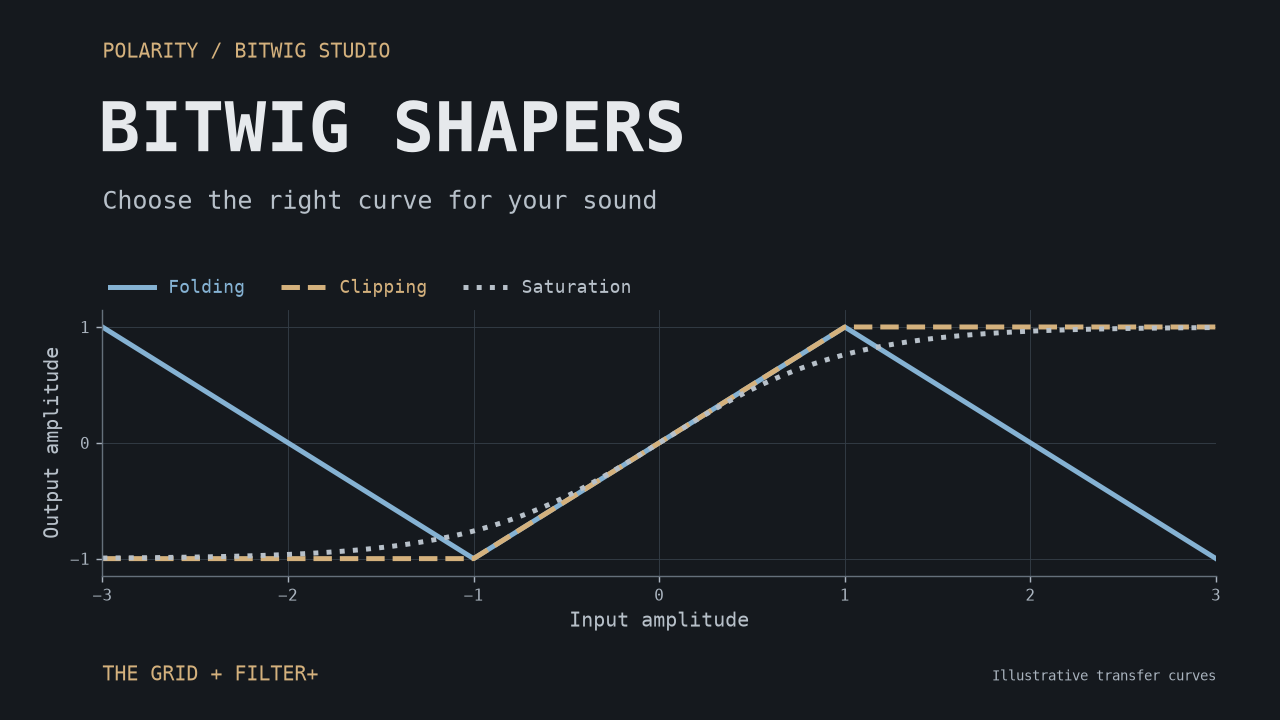
A practical guide to Bitwig's 15 Grid shapers: choose between clipping, saturation, folding, harmonic shaping, and custom curves, with starting points for basses, synths, drums, and modulation.

In this video, I demonstrate how to replicate the functionality of the Plasma plug-in by iZotope within Bitwig Studio. By using techniques like loud split, EQ adjustments, and saturation, I create a flexible method to achieve similar frequency-specific saturation effects without the high CPU usage. I also provide a free preset for download, encouraging viewers to like, subscribe, and share their thoughts in the comments.

Learn how to make drum and bass in Bitwig by starting with the bass groove, building drums around it, shaping the bass sound, and arranging a full DnB idea from scratch.

In this video, I discussed creating an arrangement and mixing on an 8 bar loop from my previous video. I identified a few issues I wanted to address, such as the drone playing all the time, the lack of modulation on the pad, and the fact that the vocals play all the time. To solve these issues, I suggested grouping all the tracks together, cloning the first block, and creating different versions of the loop. I also discussed gain staging, using a peak limiter, and adding a bit of saturation to the kick drum. Finally, I demonstrated how to use a sampler to add a rim shot to the clap.

In this video, I showed how to use subtractive synthesizers to create simple and easy bass, lead, hoover, and kick drum sounds. I started by explaining what a subtractive synthesizer is and how to create a sine wave with one. I then showed how to create a kick drum using one envelope and how to create a lead sound using unison. I also showed how to create a hoover sound using two pulse waves and pulse width modulation. Lastly, I discussed how to create synthwave basses using distortion and the monophonic mode.

In this video, I show how to turn the Polymer synthesizer into a physical modeling synthesizer using the Carpular Strong Method. This involves adding an ADSR in polyphonic mode, increasing the noise to 100%, using the comp filter instead of the cell and key filter, and modulating the drive with an ADSR. I also show some additional options like modulating the damping of the comp filter with expressions and velocity, increasing the resonance limit, softening the attack with a longer attack time, and modulating the noise envelope. I also demonstrate how to use a stereo oscillator, add distortion, and use a high pass filter for lower tones. Finally, I show how to save this as a preset and recall it when needed.

The DC Offset device in Bitwig Studio is a simple tool designed to correct DC offsets in audio recordings but becomes much more powerful with modulation, enabling creative sound design techniques like custom synthesizers, saturation, and bit-crushing effects. By converting audio signals into modulation sources, users can reshape, process, and reintroduce signals in unique ways, utilizing the full range of Bitwig modulators. This foundational device, while basic in concept, opens the door to a variety of experimental audio effects and advanced signal manipulation.

I'm sharing a free Bitwig preset called BND Wave Cycle Bender, inspired by Colugo's BND device for Reaktor, which applies pitch-tracked phase modulation to audio for unique distortion effects. This tool allows you to add new harmonics and character to your audio samples by tracking pitch and modulating them with a sine oscillator, with adjustable delay and modulation settings for creative results. You can download the preset from my Patreon or GitHub and experiment with it on your own sounds to discover interesting textures and effects.

In this video, I discuss the highly requested Drum Buss device in Ableton Live and how it can be replicated in Bitwig Studio. I provide a free preset download that mimics the functionality of the Drum Buss using native Bitwig devices. I encourage viewers to download the preset and provide feedback to help improve and tailor it to their preferences.