Textures and Drones
Production Techniques
Textures and drones are the layers that make a track feel larger than its obvious notes and drums. They often sit behind the foreground and shape the emotional atmosphere more than the musical hook.
A drone can be a long sustained tone. A texture can be noise, a blurred chord, a field recording, or a slowly changing synth layer. What matters is not the source but the function: they create space, mood, and continuity.
Why they are useful
These layers help a piece feel alive even when not much is happening rhythmically. They can connect sections, make transitions feel smoother, and stop empty spaces from feeling accidental.
They are especially useful in Ambient, Sound Design, and cinematic production, but the idea applies to many genres.
What to pay attention to
Good textures usually change slowly. Small modulation, filtering, stereo movement, and reverb can be more effective than constant dramatic changes.
The main risk is clutter. A texture should support the scene, not cover everything in fog. If it hides the important elements, it needs less level, less width, less brightness, or less movement.
Also matches: ambient textures, pads and drones, pad textures, textures, texture, drones, drone
Posts in this topic

In this video, I am showcasing my new free preset for adding textures to sounds in Bitwig Studio 3.1. I demonstrate how to use the remote controls to mix in the texture, amplify the texture sample, change the texture, and use pink noise. I also explain how the rise and fall controls work for amplitude modulation and how to use the postfx box for EQ, transient shaping, and peak limiting. The preset is called textures and can be downloaded on my Patreon page for $1 or for free if you are already a patron. I also mention my plans to add more textures samples in the future and ask for feedback on the preset.

Build a Bitwig Grid ambient Dorian drone patch with slow chord progression, bass, shimmer diffusion, and random textures using compact sequencing workflows.

Long Bitwig Grid patch-building session creating an ambient drone patch, with practical ideas for mono Grid setup, scale-quantized note generation, and noise-based textures.

This video explains how to easily create lush, spacey ambient drone music in Bitwig Studio using the Grid, focusing on stacking sine oscillators tuned to the root, fourth, and fifth notes of a scale with voice stacking, modulation, randomization, and effects like reverb and chorus. The presenter demonstrates building evolving harmonies and textures, adding sampled keyboard sounds and a simple bass, and shows how to keep everything musical while allowing flexible sound design. The result is a rich ambient soundscape perfect for long YouTube videos, with a workflow that can be adapted and expanded creatively.

In this video, I take samples from the Intimate Noise page and try to create a track. I download the free sample pack and explore the different folders, including pads and drones, one shots, and sequences. I start by using the kick samples and creating a drum loop. Then, I incorporate some of the pad samples to add texture to the track. I manipulate the sounds using different effects and plugins, such as the Hornet plugin and the Sonable smart compressor. I also create a baseline using the notes provided by the pad sample. I continue to build the track by adding more elements, including chords, FX sounds, and melodies. I use a pitch shifter and random modulators to add character and variation to the sounds. I group the different elements together and apply sidechain compression using the kick drum to create a pumping effect. Finally, I do a quick mastering using the Allzone Elements tool to ensure the track reaches the desired loudness. Overall, the goal is to create a deep house track using the samples from the Intimate Noise sample pack.

Download Polarity-RES, a free resonator plugin for Mac, Windows, and Linux, to build bandpass filters, learn harmonics, and create drones.

In this video, polarity explains how to use voice stacks to create interesting textures, melodies, and atmospheres in Bitwig Studio. The speaker demonstrates how to use a note grid, multiple MIDI channels, a polysynth, chorus, reverb, delay, and a note repeat to create a bass pattern. They also explain how to modulate the voice stack modulator with a random mod, pitch, transpose, and LFO classic to get different frequencies and textures in key.

This video explores how to recreate and expand on Bitwig Studio's granular sampler textures mode using note repeat and modulation devices, allowing for more creative control over grain shape, pitch, and playback position. By combining multi-samples, note effects, randomization, and step modulators, you can achieve evolving and complex granular textures well beyond the limitations of the default sampler. These techniques enable richer sound design possibilities, easily adjustable and even better visualized within the Bitwig Grid for advanced users.

In this video, I start from scratch in Bitwig Studio to create a nice sounding loop using special techniques. I use the Poly-Grid to create background drones with sine oscillators and phase modulation for interesting overtones. I then sample these sounds and use them in a sampler, add effects, and create percussion elements to complete the loop.

In this video, I show how to create a simple SynthWave track in Bitwig Studio. I demonstrate how to create a dreamy lead sound, a bass sound, and a drum beat. I also discuss how to use a breath controller and arpeggiator to make the track more interesting. Additionally, I talk about how to use a VHS preset and a texture plugin to add texture and atmosphere to the track. Finally, I show how to arrange the track into a cohesive song.
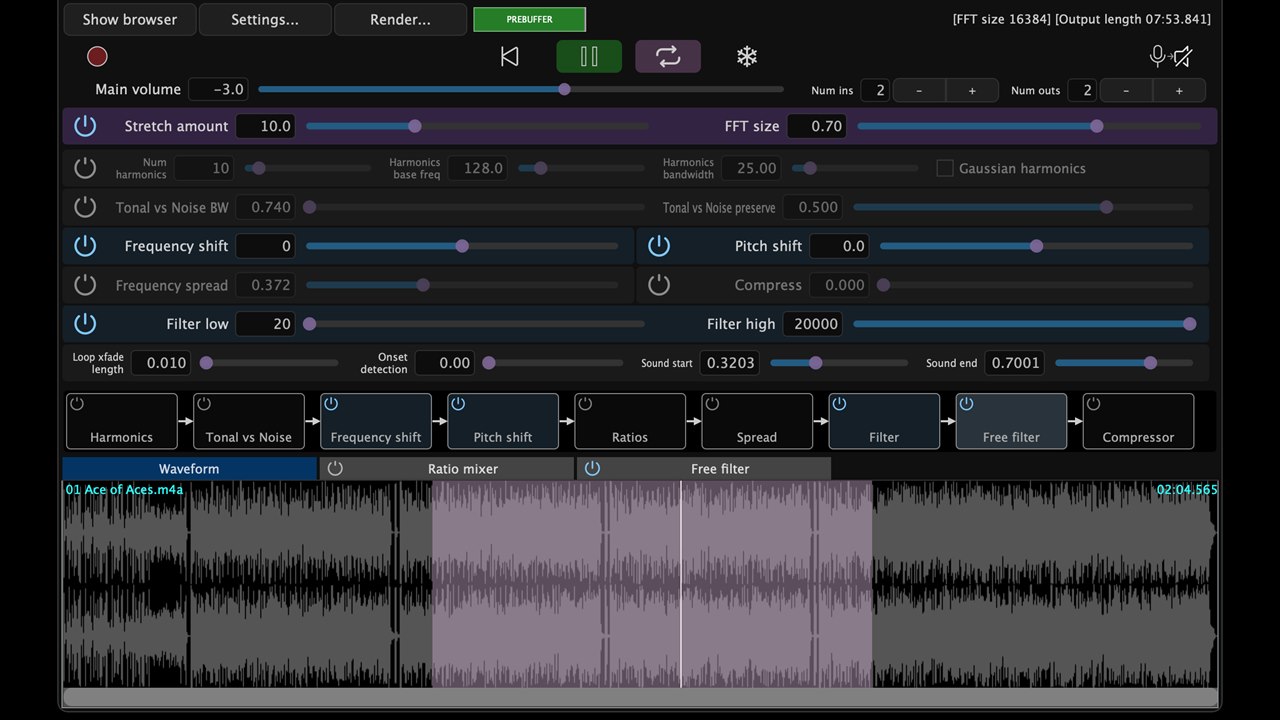
PaulXStretch is not just another granular time-stretching plugin. It is built around the Paulstretch algorithm, which stretches sound in the frequency domain, discards phase information, rebuilds the signal with randomized phase, and turns short recordings into wide, slow, spectral textures.

I'm showing how to create a sampler instrument from a kalimba using Bitwig studio. I have sampled all the plugs on the kalimba and added effects like grain, reverb and delay. I demonstrate how these effects can be used to create a rich sound. I also show a texture mode which can create a pad sound or an eerie drone sound. If you want to download the preset, you can support my channel by going to my Patreon page and subscribing with at least one dollar.

In my video, I demonstrated how to use the Oculus Spatializer plugin to create immersive spatial sounds by positioning audio sources around the listener's head using headphones for best effect. I showed how layering, stretching, and positioning sounds can craft a wide, binaural soundscape, enhancing pads and drones with increased spatial depth. The plugin is free, and I shared a link in the description for those interested in trying it out.

I'm sharing a free Bitwig preset called BND Wave Cycle Bender, inspired by Colugo's BND device for Reaktor, which applies pitch-tracked phase modulation to audio for unique distortion effects. This tool allows you to add new harmonics and character to your audio samples by tracking pitch and modulating them with a sine oscillator, with adjustable delay and modulation settings for creative results. You can download the preset from my Patreon or GitHub and experiment with it on your own sounds to discover interesting textures and effects.

In this video, I show how I use three free plug-ins to achieve my desired loudness target for my production. The first one is DbMeter5, which I use on my master bus to match the loudness peak. The second is Glitch, which I use on my drum bus to add texture and glitchy percussion. The last one is Piano Tech 7, which I use to generate drones by stretching the buffer and making adjustments.

In this video, I create a new track from scratch in Bitwig Studio 6 beta, showcasing the new automation improvements and demonstrating my workflow for building sounds, melodies, and drums step by step. I experiment with vocals, synths, and various effects to craft an atmospheric vibe, while balancing and mixing each element live as the track evolves. The project is left unfinished, focusing on creative exploration rather than perfection, and the session will be available for download on my Patreon.

Learn how to use Polarity Res, the free spectral resonator, to build resonant drums, drones and playable synth tones with MIDI, MPE and noise.

In this video, I delve into creating a melodic track in Bitwig Studio, starting with a foundational drone and building up with various synths and effects to craft a unique sound. Throughout the process, I experiment with different instruments, modulation techniques, and external gear, while explaining my choices and techniques as I go. Although the track isn't fully polished, I demonstrate how I develop ideas and lay the groundwork for further refinement and mastering.