Poly Grid - Self Running Patches
So far, most patches in this course were built like normal instruments. You press a key, the Grid receives a gate and pitch, and the patch makes a sound.
Self-running patches work differently. The idea is that the patch keeps running and keeps changing without you playing notes. This is useful for drones, generative ambient patches, modular-style systems, random melodies, and long recordings where the patch slowly evolves by itself.
A few years ago I built a small self-running patch for the official Bitwig YouTube channel. It is a perfect example for this lesson, so we will use it as our base and walk through it step by step.
The core trick is a feedback loop: the audio coming out of the oscillator is turned into a new pitch, that pitch is fed back into the oscillator, the oscillator makes a new sound, and that new sound creates the next pitch. The patch listens to itself and never repeats in exactly the same way.
Build It Step by Step #
This follows the patch from the video.
- Open a Poly Grid and click into an empty area of the grid surface.
- In the Inspector (left side panel), pull the Voices down to 0 so the patch runs mono-phonically and keeps going on its own.
- Add two Triggers modules. These divide one "bar" (the default phase length in the Inspector) into equal triggers.
- Set the first Triggers to 9.
- Set the second Triggers to 16.
- Add a Clock Quantizer and quantize the 9 triggers to the 16 triggers. This locks the slightly off-grid 9 pattern onto the tighter 16 grid, so the rhythm stays musical but not perfectly square.
- Add an oscillator and connect its output to Audio Out.
- Add a Long Delay. This allows the feedback path to work.
- Connect the oscillator output into the Long Delay.
- Scale the delay output down with an Attenuate module set to about 20%.
- Send that into a Sample & Hold, then into a Pitch Quantize module. Dial in a scale you really like.
- Connect the Pitch Quantize output to the pitch input of the oscillator. The loop is now closed.
- Connect the gate output of the Clock Quantizer to the Sample & Hold and to the AD envelope. The clock now decides when a new pitch is sampled and when the sound is triggered.
- Add a Delay FX device in the post FX of the Grid to make the whole thing more pleasant and spacious.
That is the full patch. A handful of modules, but it runs and evolves completely on its own.
The Three Things That Make It Work #
Three details are doing the heavy lifting here. If you understand them, you can build almost any self-running patch.
1. The patch is monophonic #
Pulling Voices down to 0 makes the patch monophonic, which means one voice is always active. That single active voice keeps every module processing all the time, so the patch keeps running. When the Grid is polyphonic, you need to press a key to make at least one voice active, and without a held note nothing runs.
2. The Long Delay closes the feedback loop #
The Long Delay is what makes a feedback loop possible at all. Bitwig does not let you patch a feedback path directly. If you try to connect a signal back into the input of something it already depends on, Bitwig removes the cable automatically. The only way to close the loop is to put a Long Delay in the path.
There are good reasons for this:
- Feedback without any delay produces extremely loud, very high-pitched sounds, because the signal races around the loop with nothing slowing it down.
- The delay time lets you define the "pitch" of the feedback. The delay time is more or less the length of one wave cycle. A longer cycle gives a deeper pitch, a shorter cycle or delay time gives a higher pitch.
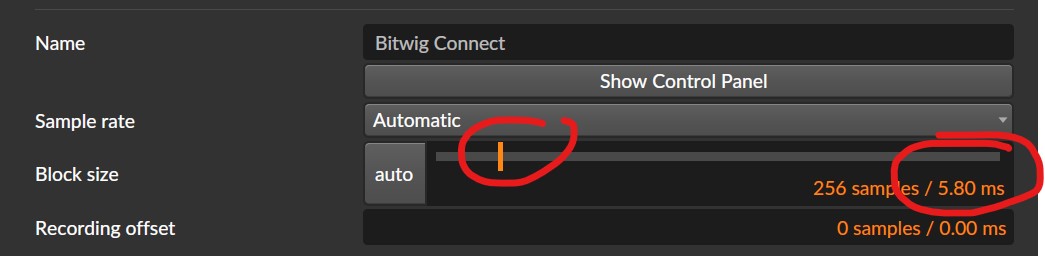
- To make sure every module can be processed in time, the minimum delay time is set by the sample buffer size in your global audio settings. You cannot go below it. That buffer is what the audio engine needs to process everything in time. On a powerful PC you can go quite low, but the more Bitwig has to process, the more you risk crackles or audio engine dropouts. So even when the Long Delay shows 0 ms, it is still limited by your buffer size.
3. Sample & Hold turns audio into pitch #
The Sample & Hold samples the audio signal at a specific point in time and then uses that captured value as a pitch. Grid cables carry compatible numeric signals, so you can repurpose audio as pitch, pitch as amplitude, and so on. The signal conventions and useful ranges are different, however, which is why we attenuate the audio before treating it as pitch. We covered this earlier in chapter 009, Signals and in the Control Signal Toolkit.
Because the value comes from the audio itself (the waveform or individual samples), it is never quite the same twice. The Pitch Quantize module then snaps it to your scale, so even chaotic input always lands on musical notes. The new note plays, its audio goes back into the Long Delay, and a moment later it becomes the source for the next pitch.
The Attenuate at 20% is what keeps the loop under control. Too much and the pitch jumps wildly over many octaves. Too little and the patch barely moves. The delay time decides how fast the system reacts to itself: shorter for busy, faster movement, longer for slow call-and-response.
Keep the Result Musical #
A few things keep this from turning into noise:
- Pitch Quantize is the safety net. Start with only a few notes, for example root, fourth, and fifth, then add thirds or sevenths once you like the motion.
- The two Triggers plus Clock Quantizer give the rhythm a slightly human, uneven feel instead of a stiff grid.
- The Attenuate amount sets how far the pitch is allowed to wander. 100% would be -1 +1 full range. 20% is probably -0.20 to +0.20 which is roughly 2 octaves up or down from C3 (which is 0 in the Grid).
Small Variations #
Once the loop works, try these changes:
- Change the active notes in Pitch Quantize while the patch runs.
- Change the Triggers divisions (try other numbers than 9) for different rhythms.
- Put a filter before the Long Delay so only part of the sound controls the pitch.
- Use a Wavetable oscillator and modulate the wavetable position from the same feedback signal.
- Branch the feedback signal to other targets too: filter cutoff, oscillator shape, or amplitude. Keep every modulation small with its own attenuator.
- Record the output for a few minutes and cut out the best parts later.
Why This Works #
This patch is generative because it has a loop with memory. It is not pure random. The current sound affects the future sound, and the Long Delay stores part of the past. The Pitch Quantize keeps the loop inside a musical pitch set, while the feedback keeps it moving. That is why it can feel alive even though it is built from only a few modules.
From here you can keep adding layers, but the core idea stays the same: the patch listens to itself and uses that signal to decide what happens next.
If you want to hear where this kind of patch can go, have a look at my generative music videos. Most of them grew out of small self-running systems like this one.
▶ Next Lesson: FX Grid: Building Audio Effects
◀ Previous Lesson: Timing, Triggers and Probability
▲ Bitwig Grid Course Overview