EQ
Production Techniques
EQ is one of the most important tools in music production because it changes where a sound lives in the frequency spectrum. If two sounds fight for the same space, EQ can help separate them. If a sound feels dull or harsh, EQ can reshape its tone.
That makes EQ both corrective and creative. It can solve practical problems, but it can also become part of the sound-design process itself.
What EQ is really about
The beginner mistake is thinking EQ is mostly about boosting what sounds nice. In reality, it is often more about making room.
- Cut mud so the low mids feel cleaner.
- Remove harshness so a sound stops hurting.
- Reduce overlap so important parts stay readable.
- Add a little presence when something needs to speak more clearly.
A useful mindset
EQ works best in context. A sound that seems too dark on its own may be perfect in the full mix. A sound that seems huge alone may be masking everything else.
So the real question is rarely "Is this sound good?" It is "Does this sound fit with the other sounds around it?"
Also matches: frequency balance, tonal balance, equalizing, equalizer, EQ
Posts in this topic

In this video, I demonstrated how to clone EQ settings using impulse responses, showing the process with tools like an EQ curve analyzer, Ozone 8 EQ, and a convolution device. By recording the output of the Ozone 8 and using a test tone or Dirac signal, I showcased two methods to replicate the linear phase EQ setting. This technique is useful especially if you don't have a built-in linear phase EQ in your DAW like Bitwig.

In the video, I explained the concept of using a tilt setting of 4.5 dB per octave to achieve a balanced mixdown. I demonstrated how this can be applied within Bitwig's EQ+ and also within the Grid. By using the node signal and modulating the gain, I showed how to achieve the desired frequency balance without relying on external EQ processing.

In this video, I rediscovered an old plugin called Curve EQ, which I've had for around 20 years and find invaluable for layering drum loops by using its match EQ feature to remove overlapping frequencies. Instead of constantly adjusting a regular EQ, I've shown how to use Curve EQ to statically match and inverse the frequency spectrum of a simple kick and snare loop with another drum loop, achieving perfect layering without CPU strain. I also expressed a wish for some of these features to be integrated into the main GUI for easier access, and suggested it to the developer, Alexei.

In this video, I explain my favorite init settings for the EQ Plus in Bitwig Studio 3.2. I start with a completely empty project and add a fully grid, saw wave, ADSR, and an audio art. With the EQ Plus, I remove all the init settings to start fresh. I explain the harmonic series, which produces harmonic overtones when using a saw wave. To set up bands for these harmonics, I add a band for the fundamental frequency of C3. I save the EQ Plus as an init preset to remember that changing the gain for the first band changes the fundamental frequency. I add bands for the different harmonics and use the key track to keep track of the pitch or notes played. The key track also keeps track of any pitch band girfs applied. I saved this as an init preset for pitch tracking or note tracking, which works well for monophonic sounds such as bass sounds. I also demonstrate how the EQ Plus follows pitch tracking custom pitch tracking and works alongside the kick drum. Overall, this is a useful trick in a toolbox to apply to EQs and other instruments.

In this video, I discuss the issues surrounding Bitwig's EQ Plus, specifically the phase shift problem that occurs when it's used in parallel processing, which can create a frequency notch at the top end. While EQ Plus works fine when used on its own or in parallel with another EQ Plus, the EQ5 is preferable for parallel processing with different devices due to its lack of phase shift. I hope Bitwig addresses this issue in future updates, as it's a long-standing problem, but in the meantime, knowing these differences can help users decide which EQ to use in specific scenarios.
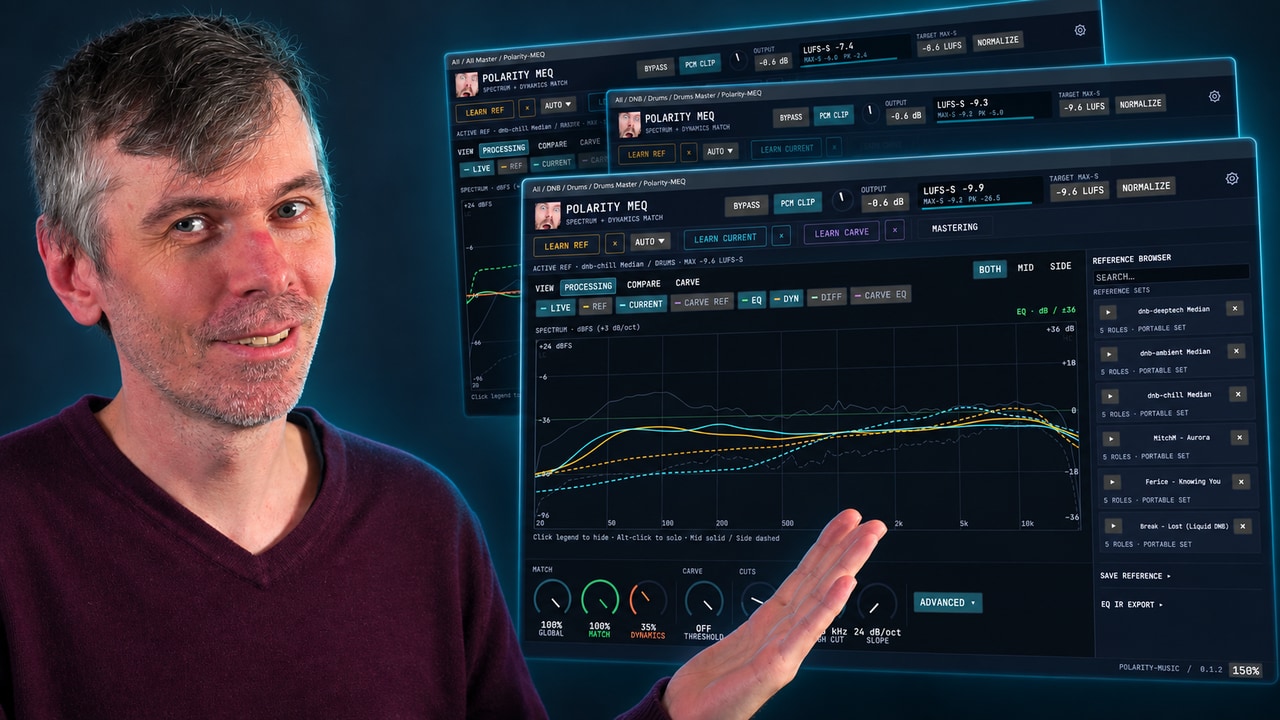
Learn how Polarity-MEQ delivers free EQ matching, loudness and dynamic matching, and sidechain carve EQ for more consistent mixes.

In this video, I demonstrate creative ideas for using the EQ inside Bitwig Studio. By utilizing the FX grid and voice stacking, I show how to apply polyphonic modulations to the EQ Plus. This technique allows for unique waveforms, modulation offsets, and the ability to sequence and morph between EQ settings.

I just installed the Morph EQ by Minimal Audio and wanted to share my first impressions of it. It is an EQ that allows you to draw in the desired EQ curves, giving you a lot of sound design possibilities. You can assign an LFO to it or use automation to modulate the curves. It also has a randomize option which can create some great results. It's a great plugin for sound design and I would definitely recommend it.

In this video, I discuss a new EQ plugin called Scaler EQ, which allows you to select a scale and only choose frequencies that are within that scale. I demonstrate how you can replicate this functionality in Bitwig Studio by using EQ plugins and the pitch quantizer. While the interface cannot be replicated, the technical aspects can be achieved.

In this video, I showed what the new Smart EQ 3 plug-in from Sonible from Austria can do. I tested it out on my own track called Craft and went through how to use it for drums, bass, and the master. I showed how to apply different profiles and manual EQ, as well as how to use the grouping feature to make sure the tracks work well together. I also mentioned that Smart EQ 3 is aware of the context EQing and prioritizes certain things over others. Lastly, I suggested that users try out the trial version to get a feel for the plug-in, and if they like it, to purchase it.

The Melda MMatcher EQ plugin is a powerful tool for achieving consistent frequency balance across tracks by allowing you to create and use custom reference curves, including separate processing for mid and side channels. It excels at quickly identifying mix issues and ensuring a uniform sound, especially when working with albums or EPs. The plugin can be applied not just on masters but also on individual buses like drums or bass, and you can create more reliable reference curves by averaging multiple tracks, with advanced features for fine-tuning and analyzing by stem if desired.

In this video, I cover three different topics related to EQ techniques. The first is an auto leveler method using bandpass filters and an amplifier to maintain a consistent volume. The second is a multi-band EQ compressor, created by combining an EQ with a grid compressor, allowing for individual frequency control. Lastly, I demonstrate the use of the Loud Split device to selectively affect different frequency ranges in a sound, helpful for removing noise or enhancing specific elements.

In this video, I introduce Spectrum Thief, a free plugin designed to clone EQ curves from speaker cabinets or amplifiers, which I also creatively use to streamline EQ chains and match sounds like snares and percussion. The plugin allows you to capture and export impulse responses, saving CPU and making it easy to share projects without requiring others to have the same plugins. Its high-resolution matching and flexible features make it a powerful tool for both guitarists and electronic producers looking to replicate or shape unique spectral signatures.

In this video, I demonstrate an alternative method for matching frequency content and tonal balance in Bitwig Studio using native tools like FX3, peak limiter, and compressor. By analyzing and adjusting the frequency ranges, you can effectively match your mix to a reference track without the need for external plugins. It's a straightforward and insightful approach to help ensure your mix is balanced and comparable to professional standards.

In this video, I demonstrate a unique technique in Bitwig using pre-emphasis and de-emphasis with tilt EQs to mimic multi-band limiting and achieve more balanced loudness across frequency ranges, without traditional band splitting. By tilting the analyzing signal fed into auto-levelers or limiters, you can shift how loudness is controlled across your mix, changing the tonal balance solely through volume adjustments. This approach allows for more natural and flexible mixdowns and can be applied not just to limiting but also to compression, reverb, and other effects, potentially streamlining your workflow and achieving more transparent results.

In this video, I demonstrate two tips in Bitwig Studio. The first tip is about adding dirtiness to kick drums using either distortion, noise modulation, or using the EQ with a render modulator. The second tip is about creating a mono effect below a certain frequency using the mid-side split and a high pass filter.

In my recent video, I received a lot of love, praise, likes, and comments, which warmed my heart. I wanted to continue sharing knowledge about Bitwig Studio and unique ways of eqing. I introduced a visual guide using EQ+ and a loud split device to help identify and adjust frequency distribution, making EQing easier and more efficient.

In this video, I discussed why it's important to balance your frequencies before going into a limiter or clipper. I showed how to do this easily by using a tilt setting, or by using a VST plugin like Ozone 8 and using the Matching EQ feature. I also showed a method of using multiple band pass filters with a reference level tool to reach the same goal. Finally, I discussed the importance of not overdoing the brightness as it can lead to an overly sharp mix.