Loudness
Production Techniques
Loudness is the perceived strength and impact of a mix. It is related to level, but it is not just about turning the master up. A track can measure loud and still feel weak, or measure lower and still feel punchy and clear.
This is why loudness is really a balance problem, not only a limiter problem.
What usually creates perceived loudness
- balanced frequency content
- controlled peaks
- enough midrange information for the ear to grab onto
- a sensible amount of dynamic range for the genre
If one part of the spectrum is exaggerated or if a few peaks are sticking out too much, the whole track often feels quieter than it should.
Why clipping and limiting are only part of the story
Many people look for one device that makes a mix loud. In practice, loudness usually comes after good decisions earlier in the chain. A balanced spectrum, controlled low end, and sensible transient handling make clipping and limiting work better.
That is why your posts often connect loudness to EQ balance, pink-noise-style visual guides, and dynamics instead of only to a final mastering plugin.
A practical way to think about it
Do not ask only, "How can I make this louder?" Ask:
- What peaks are stopping me?
- Is the spectrum balanced?
- Is the low end eating headroom?
- Am I trying to force loudness from a weak arrangement or weak source sound?
Those questions usually lead to better results than chasing numbers alone.
The posts below collect practical explanations and examples for getting a mix louder while keeping it usable, musical, and genre-appropriate.
Also matches: dynamic range, peak limiter, clipping, dynamics, loud mix, loudness, louder, loud
Posts in this topic

In this video, I showed how to make something sound loud and punchy. I explained that you need to balance out the frequency spectrum and reduce the dynamics with a peak limiter. I then explained how to use FX3 to make multi-band limiting easier and showed how to use a hard clip to get a lot of loudness while still sounding good.

In this video, I discussed creating an arrangement and mixing on an 8 bar loop from my previous video. I identified a few issues I wanted to address, such as the drone playing all the time, the lack of modulation on the pad, and the fact that the vocals play all the time. To solve these issues, I suggested grouping all the tracks together, cloning the first block, and creating different versions of the loop. I also discussed gain staging, using a peak limiter, and adding a bit of saturation to the kick drum. Finally, I demonstrated how to use a sampler to add a rim shot to the clap.

In this video, I discuss my workflow process when it comes to mixing down dance floor tunes. I stress the importance of starting with the creation process and how that influences the mixing process. I demonstrate how to use a transient shaper, a limiter, and a clip to reduce dynamics and create a punchy sound. I also discuss the importance of frequency balance and how it is influenced by the length of the samples and the BPM. Finally, I discuss how to create a hierarchy in the mix by making the kick drum the loudest part and then gradually reducing the volume of the snare and high hat.

In this video, I demonstrate how to use expansion to make drum samples from libraries fit better in a mix by stretching the dynamic range. Using Bitwig Studio, I highlight methods like the dynamics module, compressor plus, and transfer curve to enhance the groove and dynamics of over-compressed samples. This approach helps create a cohesive mix where all sounds blend seamlessly.

In this video, I introduce the plugin DP Meter 4, which I have used for years and recently rediscovered. It is very helpful for metering loudness and integrating loudness, and also has a feature to level out the volume of tracks to a reference value. This is a manual process, but it is more reliable than other similar plugins I have used in the past. Additionally, I explain the benefits of using the EBU R182 standard for loudness, and how it can be used for consistency purposes. I also share a tutorial for using DaVinci Resolve to normalize audio levels to a specific reference value using the same standard. Overall, I think incorporating a tool like DP Meter 4 or a similar feature into Bitwig Studio would be a great idea.

In this video, I discussed why it's important to balance your frequencies before going into a limiter or clipper. I showed how to do this easily by using a tilt setting, or by using a VST plugin like Ozone 8 and using the Matching EQ feature. I also showed a method of using multiple band pass filters with a reference level tool to reach the same goal. Finally, I discussed the importance of not overdoing the brightness as it can lead to an overly sharp mix.

In this video, I demonstrate my workflow for gain staging a track. I start by going to the settings and changing the default new track volume to 0dB. I then select all of the tracks and set them to 0dB in the inspector. I then group the tracks together into meaningful subgroups like drums, bass, and music. I then gain stage all of the tracks, starting with the kick, by using the peak limiter to bring the volume up to the ceiling of the threshold. I then apply different gain staging methods, like limiters and clippers, to the different subgroups. Finally, I bring all of the subgroups together into an "all" group, which is my master chain, and use a track reference track to compare my track to.

Polarity MD is a newly released, completely free multiband dynamics plugin featuring four-band OTT-style compression with both upward and downward compression, as well as clippers on each band and the input and output. Compatible with all major platforms and plugin formats, it has a user-friendly, web-based interface and is designed to make tracks louder and more controlled with minimal setup. The plugin is currently in beta, available for download, and the developer welcomes feedback and suggestions to improve its performance and features.

In this video, I explain how to use DP Meter 5 to measure loudness levels and gain staging. I also explain the different modes, such as RMS mode, EVO mode, and dial mode. I show how to use the RMS integrated value, RMS momentary, RMS momentary max, true peak max, crest factor, and loudness range. I also explain how to use the gain setting, match button, and reference level. Lastly, I explain why you should use EVO instead of RMS, and how frequencies are factored into the numbers.

Polarity MD is a powerful, free multi-band dynamics plugin featuring four bands with downward and upward compressors, a clipper, and a range of global controls, now updated with oversampling, linear phase crossovers, normalization, and improved output matching features. This version offers expanded compatibility with various Linux distributions and enhancements like soloing bands, accessibility improvements, and resizable interface with saved window states. Users are invited to test the latest Beta 9, report bugs or requests, and enjoy a robust mastering tool without registration or cost.

In this video I discussed how to mimic the behavior of the DSEQ3 with Bitwig Studio's native Loud Split device. I demonstrated how to set the Loud Split device to a 3 dB per octave tilt setting and how to adjust the loudness level, knee setting, and rise and fall settings. I showed how to identify resonances and over amplified frequencies in a mixdown and how to use the Loud Split device to reduce these frequencies. I also suggested using the Loud Split device for mastering.

In this video, I provide updates to my Hard Clip and Auto Level presets, both of which are now available for free download with new features like LED clipping indicators and improved functionality. I've introduced options such as different clipping modes, band splitting, and a stereo link feature, while addressing phase shift issues and incorporating spectral-based solutions. Additionally, for the Auto Level preset, I added features such as an amount knob and stereo link, and I shared an experimental Auto Level Plus version for quick mastering solutions.
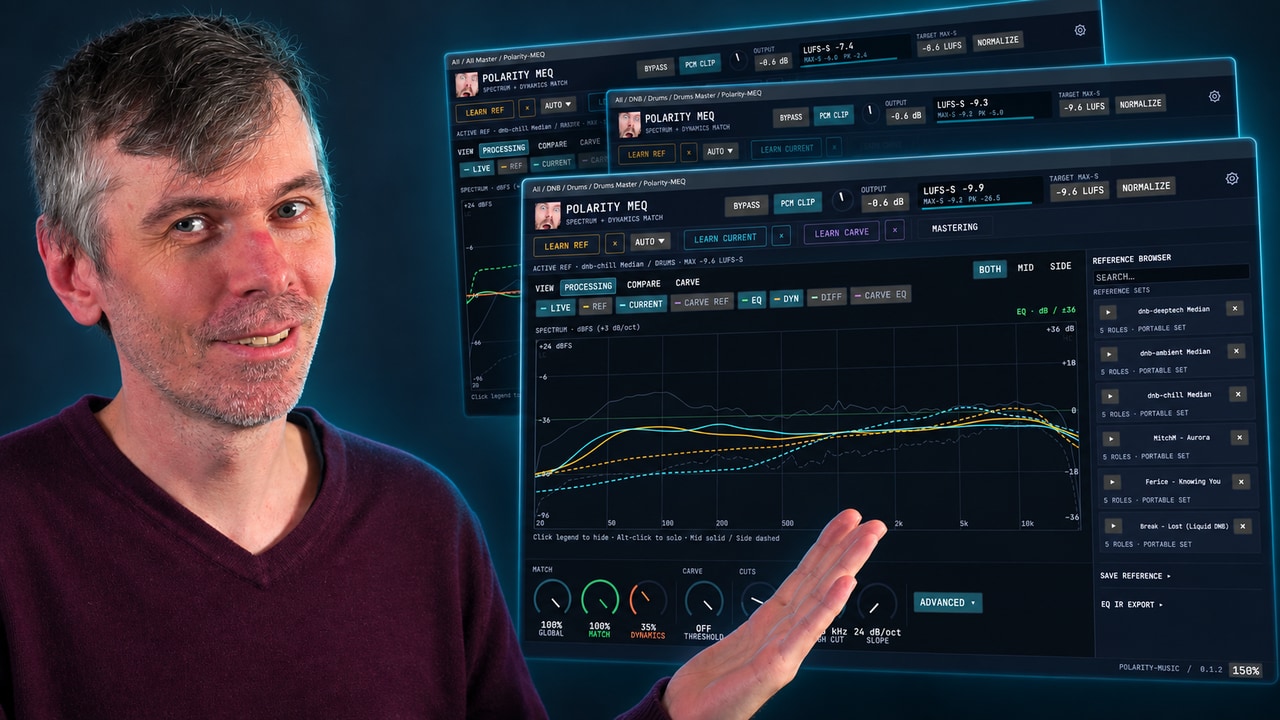
Learn how Polarity-MEQ delivers free EQ matching, loudness and dynamic matching, and sidechain carve EQ for more consistent mixes.

I created a preset card Hard-Clip for Bitwig Studio to clip the peaks of audio signals without going into the red or having intersample issues. The preset consists of Bit8, initial settings and two tool devices. I explained how to use it and how it can help to make a track sound louder and more percussive. I shared the preset in the description of the video, in my GitHub repository, on bitwig.community/presets and on the Bitwig Discord. I encourage viewers to save money and support my channel by using the link to the Bitwig Store with my code.

The Bitwig Studio peak limiter is a simple, low-latency tool designed to control audio peaks and prevent signals from exceeding 0 dB. It features intuitive visual displays for input, output, and gain reduction, with easy controls for input gain, ceiling, and release time to tailor its response to different types of sounds. While not the most advanced limiter, it is highly practical for managing unpredictable audio and increasing volume safely in any project.

In this video, I demonstrate a unique technique in Bitwig using pre-emphasis and de-emphasis with tilt EQs to mimic multi-band limiting and achieve more balanced loudness across frequency ranges, without traditional band splitting. By tilting the analyzing signal fed into auto-levelers or limiters, you can shift how loudness is controlled across your mix, changing the tonal balance solely through volume adjustments. This approach allows for more natural and flexible mixdowns and can be applied not just to limiting but also to compression, reverb, and other effects, potentially streamlining your workflow and achieving more transparent results.

Learn how to make drum and bass in Bitwig by starting with the bass groove, building drums around it, shaping the bass sound, and arranging a full DnB idea from scratch.

Smart Comp 3 by Sonable offers a unique visual approach to compression, allowing users to intuitively match compression settings between different tracks using a map-based interface for greater consistency across projects. Unlike traditional compressors that require manual adjustment of attack, threshold, release, and ratio, this tool lets you visually place your sound in the desired compression zone and easily replicate that setting across multiple drum tracks or projects. While the plugin is currently only full-band and not multiband, its intelligent analysis and goal-focused workflow make it an exciting option for producers seeking matched dynamics and cohesive sound.