Curve
Bitwig Platform
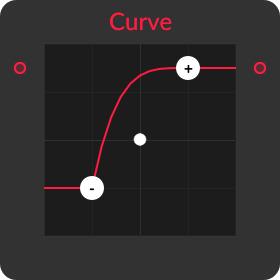
A bounded range mapper with independent input/output endpoints and a continuously bendable interpolation curve.
What it does
Curve maps Low In to Low Out and High In to High Out, clips values outside that input interval to the corresponding output endpoint, and bends values inside the interval with a logarithmic- or exponential-like response.
Controls and ports
| Control | Label | Official description |
|---|---|---|
curve |
Curve | Curve factor, where '0 %' results in no change, positive values impose a logarithmic-type curve, and negative values impose an exponential one |
xy |
Clickable Curve Interface | With points for the highest input/output level [+], the lowest input/output value [-], and the curvature (shown in the middle of the line) |
low_in |
Low In | Lowest input level remapped (incoming values below this level will be clipped at the Out Low level) |
low_out |
Low Out | Lowest output level |
high_in |
High In | Highest input level remapped (incoming values above this level will be clipped at the Out High level) |
high_out |
High Out | Highest output level |
Practical uses
- Convert a modulation source from one range into the exact destination range you need.
- Reverse the output endpoints to invert a signal while remapping it.
- Use curvature to make the lower or upper part of a control gesture more sensitive.
Things to know
- Inputs below Low In and above High In clip to the output endpoints.
- Changing endpoint order can invert or collapse the mapping.
- Curve zero is the reference linear interpolation.
- The recovered
bend_curveis a plausible normalized core, but it does not include endpoint normalization or clipping.
Technical details
A medium-confidence Nitro implementation candidate supports the technical summary, but the visible-module mapping remains inferred.
A complete visible mapping can be described as: clamp input between the two input endpoints, normalize it to t, bend t, then interpolate between Low Out and High Out. The atlas contains a likely normalized helper bend_curve that performs two passes of x <- x*((1+b)-b*x), but no wrapper evidence proves its exact binding or how the visible Curve parameter maps to b. Endpoint ordering, degenerate ranges, and clipping are not represented by that helper.
| Nitro port | Type |
|---|---|
in |
InputAudioPortType |
bend |
InputAudioPortType |
out |
OutputAudioPortType |
Open questions
- Measure normalized output at fixed fractions for the full Curve range and fit it to the recovered helper.
- Test reversed/equal input endpoints, reversed/equal output endpoints, out-of-range input, signed zero, and automation.
- Confirm stereo handling, parameter smoothing, numeric precision, and exact UI-to-bend mapping.
Version and sources
Checked against Bitwig Studio 6.0.6. This page combines Bitwig's module metadata, the existing Grid course and guides, and Nitro analysis where the mapping is strong enough to support a technical statement.
Related material
Return to Bitwig Grid Modules or the Grid Modules course lesson.
Also matches: Bitwig Curve module, Bitwig Grid Curve, Curve Grid module