Hard Clip
Bitwig Platform
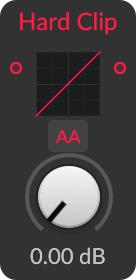
A hard limiter that multiplies the input by Amount and caps it at fixed positive and negative boundaries.
What it does
Hard Clip leaves the driven signal unchanged until it reaches the clipping limits, then replaces all larger magnitudes with the boundary value. This controls peaks aggressively and adds the sharp corners associated with bright odd-harmonic distortion.
Controls and ports
| Control | Label | Official description |
|---|---|---|
amount |
Amount | Amount of gain applied |
Practical uses
- Trim short drum peaks before a limiter or loudness stage.
- Drive a sine or bass into the boundaries for a square-like, harmonically dense tone.
- Compensate output level after increasing Amount when comparing tone rather than loudness.
Things to know
- Hard clipping does not prevent inter-sample peaks after later reconstruction or filtering.
- It creates strong high harmonics and can alias audibly, especially on high fundamentals.
- HQ changes the discrete-time treatment around discontinuities, not the intended static ±1 transfer curve.
- The linked Hard Clip article demonstrates broader preset workflows rather than this Grid module alone.
Technical details
A high-confidence Nitro implementation candidate supports the technical summary, but the visible-module mapping remains inferred.
The exact grid/shaper/hardclip body forms u = drive*x. Its direct transfer is clamp(u,-1,1) through the ADAA helper's direct mode; HQ uses the helper's antiderivative hard-clip evaluation. Processing iterates over four Grid sub-samples and maintains antialiasing state across blocks. The body exposes no threshold or make-up gain because Drive moves the input relative to fixed ±1 limits.
| Nitro port | Type |
|---|---|
x |
InputAudioPortType |
drive |
InputAudioPortType |
HQ |
InputValuePortType |
out |
OutputAudioPortType |
Open questions
- Measure HQ alias suppression, latency, overshoot, and state behavior on impulses and automated Drive.
- Confirm Amount calibration, clip boundary, stereo independence, and behavior for non-finite values.
- Compare sample peaks and reconstructed inter-sample peaks at several sample rates.
Version and sources
Checked against Bitwig Studio 6.0.6. This page combines Bitwig's module metadata, the existing Grid course and guides, and Nitro analysis where the mapping is strong enough to support a technical statement.
Related material
Return to Bitwig Grid Modules or the Grid Modules course lesson.
Also matches: Bitwig Hard Clip module, Bitwig Grid Hard Clip, Hard Clip Grid module